You can have the copy written, the list cleaned, and the sending tool ready, then watch the first campaign vanish into spam anyway. That's usually the moment a B2B team realizes a new domain isn't a launch switch, it's an asset that has to earn trust before mailbox providers let it through. If you're trying to how to warm up email domain without burning it in the first week, the fix is less about volume and more about proving, step by step, that real recipients want your mail.
Table of Contents
- Why a Cold Domain Disappears and What Warm-Up Does
- Setting Up SPF, DKIM, and DMARC Before You Send Anything
- The Week-by-Week Warm-Up Schedule That Builds Reputation
- Manual Seeding Versus Warm-Up Tools and Multi-Inbox Scaling
- Reading the Signals That Tell You Warm-Up Is Working
- Common Mistakes That Quietly Undo Warm-Up Progress
- Your Warm-Up Checklist and the Moment to Launch Full Campaigns
Why a Cold Domain Disappears and What Warm-Up Does
The setup looks finished. The domain exists, the sequence is approved, and the launch date is already on the calendar. Then the first send lands and nothing meaningful happens, because mailbox providers do not care that the work feels complete on your side, they care whether the domain has shown consistent, legitimate behavior over time.
That is why domain warm-up is a multi-week reputation-building process, not a one-day setup task. Microsoft defines it as “the process of methodically adding email volume to a new domain over several days or weeks,” and its staged audience guidance is explicit about who should receive mail first, then next, then later, based on recent engagement. For a practical operator's view of how trust gets built, Breaker's guide to email domain trust is a useful companion because it frames reputation as behavior, not branding.
What mailbox providers watch
A cold domain fails because it has not given inbox systems enough proof. A warm domain succeeds because it keeps sending to people who open, click, and reply, which creates the positive signals providers use to judge legitimacy. The important detail is that this proof has to accumulate steadily.
Practical rule: a new domain should look boring to inbox providers. No spikes, no long silences, no sudden audience jumps, just consistent sends to the people most likely to engage.
That is the purpose of warm-up. It is not to make a sender “eligible” in some abstract sense, it is to manufacture the exact signals Gmail, Outlook, and other providers rely on when they decide whether to place future mail in the inbox or filter it away. If the first few sends go to a weak audience, the domain starts building the wrong reputation from day one.
The reason this matters is simple. Inbox providers do not reward intent, they reward patterns. A domain that sends a small, steady stream to an engaged list looks safer than one that jumps from nothing to a big blast, even if the big blast comes from a legitimate team.
Why the old launch mindset breaks
The common mistake is treating a new domain like an already trusted one. Teams buy the domain, connect the platform, and assume the reputation from their old sending identity transfers automatically. It does not.
Warm-up exists because a brand-new sending identity has no history. Every early send either reinforces trust or adds doubt, and the inbox placement outcome depends on which signal dominates. That is why the rest of this article keeps coming back to engagement, not just countable volume. A domain does not get warmed by time alone, it gets warmed by time plus the right recipient behavior.
A cold domain also disappears fast because mailbox providers have no reason to keep giving it room. If the early sends miss the inbox, go unopened, or trigger complaints, the domain can spend the next campaigns working against its own first impression. The practical goal is to build enough positive interaction that providers start expecting normal mail behavior before you scale.
Setting Up SPF, DKIM, and DMARC Before You Send Anything
Warm-up can't repair broken authentication. If SPF, DKIM, or DMARC are misconfigured, the domain can follow a perfect volume ramp and still struggle, because mailbox providers first want to know that the message is authorized to come from the domain it claims to represent. That's why authentication comes before volume, not after it.
Build the foundation in the right order
Start with SPF, which tells providers which systems are allowed to send on your behalf. Then set up DKIM, which signs messages so providers can verify they haven't been altered in transit. Finish with DMARC, which gives the domain a policy layer and makes the alignment story easier for inbox systems to read.
For most B2B teams, the common path is straightforward, Google Workspace or Microsoft 365 on one side, a cold outreach platform on the other, and DNS records in the middle. The failure point is usually not the idea of authentication, it's a small mismatch in the DNS setup that makes the sending tool look successful while the mailbox providers still distrust the mail.
| Record | Purpose | Healthy Signal |
|---|---|---|
| SPF | Authorizes approved sending systems | Messages are sent only through allowed services |
| DKIM | Signs messages cryptographically | Outbound mail is signed and verifiable |
| DMARC | Sets alignment and policy expectations | Authentication passes consistently with aligned headers |
The checklist that should happen before warm-up volume
- Confirm SPF alignment: Make sure the sending service is covered by the domain's authorization path.
- Verify DKIM signing: Test that mail leaving the platform is signed under the right domain identity.
- Apply DMARC carefully: Start with a policy that supports visibility, then tighten as confidence improves.
- Check the visible sender identity: The domain the recipient sees should match the authenticated identity as closely as your stack allows.
- Validate after propagation: A record can look correct in the tool and still fail in the broader DNS environment for a short period.
If you want a practical implementation checklist for account setup workflows, the internal notes on Lead Printer's blog are a useful operational reference point, especially for teams coordinating outbound infrastructure across multiple inboxes.
Authentication doesn't make a domain warm. It just removes preventable friction so the warm-up work actually has a chance to register.
The Week-by-Week Warm-Up Schedule That Builds Reputation
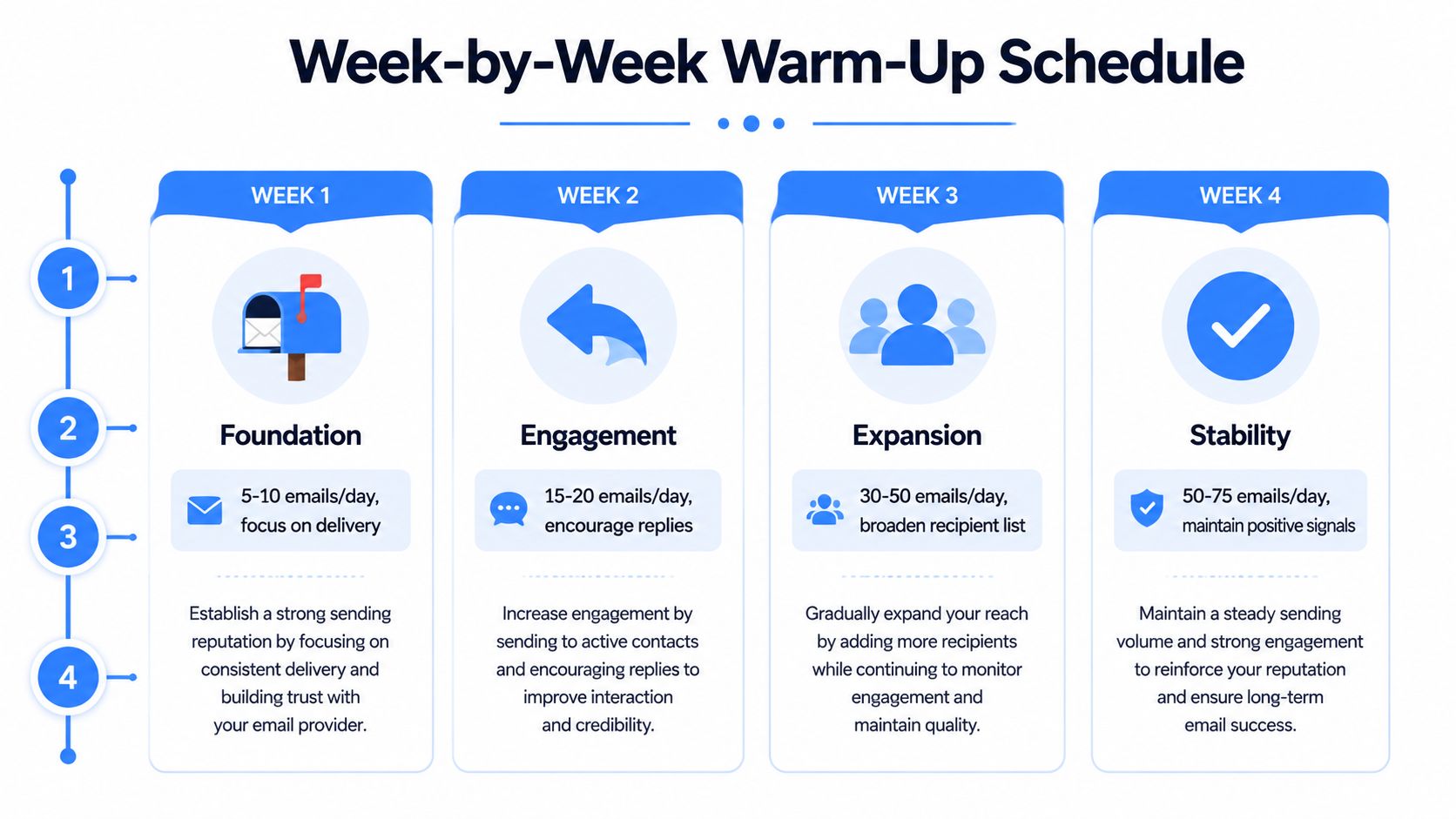
The first mistake is treating warm-up as a calendar exercise. A domain earns trust only when the right recipients respond in the right way, so the schedule has to follow engagement, not just a preset volume curve. Early sends should stay inside the group that already knows the brand, then widen only after the inbox signals stay stable. Litmus recommends planning 4 to 8 weeks before fully cutting over from an old sending identity, with the first week limited to about 1% of the best subscribers and then doubling each week Litmus warm-up guidance.
Week 1 and Week 2 focus on the easiest yes
The first sends should go to people who already behave like engaged recipients. Recent openers, recent clickers, and contacts who are used to hearing from your brand are the safest start. The goal is fast positive feedback, not raw volume.
Operationally, many playbooks begin around 15 to 20 emails per day and hold that range long enough to watch mailbox response before stepping up Postmark warm-up guide. Some teams start lower, which can be the right call if the domain is brand new or the list quality is uneven. The trade-off is simple, slower volume growth buys more room to prove the sender is legitimate.
Week 3 and Week 4 broaden the audience carefully
By the third and fourth week, the domain should be showing steadier behavior. At that point, the audience can expand to the 60-day active set, as long as open and reply activity stays healthy and complaints remain quiet. Brevo's guidance keeps the control tight here, with a slow ramp, complaint thresholds below 0.1%, bounce rates below 3%, and no pauses longer than 7 days Brevo warm-up guidance.
This is also where many teams get impatient and push too soon. Inbox providers respond to pattern quality, not enthusiasm. If the early audience is still generating clean engagement, the better move is to hold the cadence steady and let the domain absorb the added volume without a sudden jump in behavior.
Operational shortcut: if the audience quality drops before the volume rises, the schedule is already wrong. Fix the recipient pool before you add sends.
How to read the ramp
A healthy warm-up looks like controlled growth, not a race to a target number. In practice, the early bands often sit in the 5 to 50 emails per day range, then move toward 50 to 100 emails per day after several weeks if the signals stay clean Postmark warm-up guide, ReachInbox warm-up summary. Use those bands as guardrails, then let engagement decide whether you hold, step up, or pause.
For teams that need to coordinate outbound infrastructure across multiple inboxes, Lead Printer agency overview is a useful reference for how the moving parts usually fit together in practice.

Manual Seeding Versus Warm-Up Tools and Multi-Inbox Scaling
A cold sender rarely needs more automation. It needs cleaner proof that real people will open, reply, and keep the thread alive. Manual seeding gives you that proof fastest, because a reply from a known contact carries more weight than synthetic clicks or scripted activity. On new domains, I still start here whenever the list is small enough to make that effort worthwhile.
What each approach is good at
Manual seeding is best for the first stretch, when the goal is to create authentic interaction with a narrow set of safe recipients. It does not scale cleanly, and that limitation is the point. A handful of real conversations gives mailbox providers a better trust signal than a larger batch of low-quality sends.
Warm-up tools help once the cadence needs to stay steady and the sender cannot keep up by hand. The right use case is pacing, not imitation. A tool can keep daily volume in line and reduce operator error, but it should not be used to pretend the domain has earned engagement it has not earned yet.
Multi-inbox scaling comes into play when one inbox cannot carry the volume without putting too much pressure on the domain. It only works if every inbox is warmed on its own and each stream behaves cleanly. Split volume too early, and you just create more cold surfaces that need to prove themselves from scratch.
For teams that want a practical view of how outbound infrastructure and campaign operations are usually organized, the Lead Printer agency overview is a useful reference point.
A workable decision rule
- Start manual in week 1. Use your most engaged contacts first and watch the domain response closely.
- Add a tool in weeks 2 through 4. Let it hold the cadence steady, not manufacture engagement.
- Add inboxes only when volume demands it. If a sender needs to clear more than 100 sends per day, the pressure usually starts to justify splitting across senders, as long as each new inbox is warmed on its own Postmark warm-up guide.
The trade-off is straightforward. Manual seeding gives you the strongest trust signal, tools give you repeatability, and multi-inbox setups give you scale. The wrong move is using any of them to hide weak list quality or to outrun reputation. That tends to work for a short stretch, then inbox providers catch up.
Reading the Signals That Tell You Warm-Up Is Working
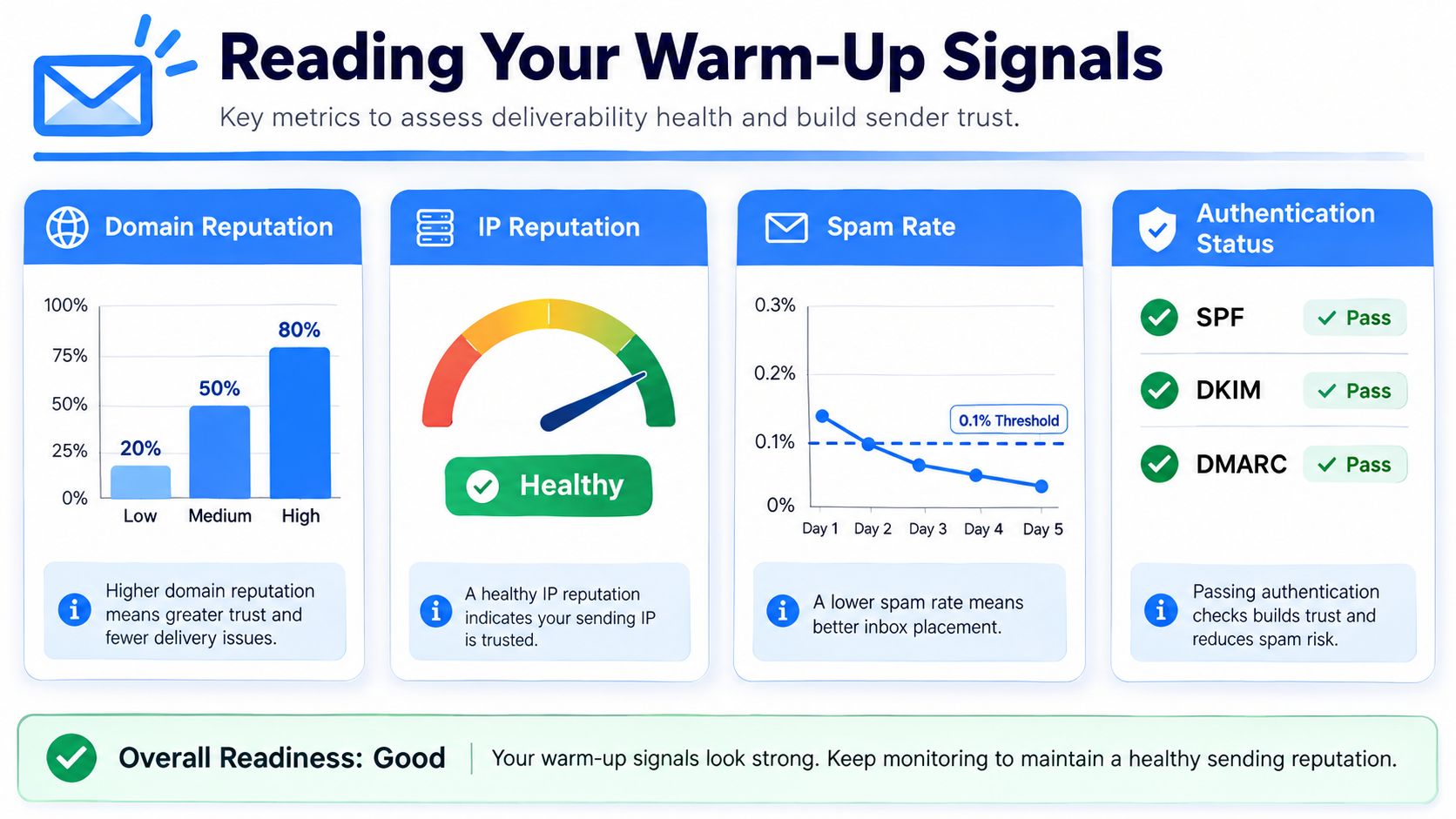
Warm-up without monitoring is guessing. Google Postmaster Tools shows how Google sees domain reputation, IP reputation, and spam-related signals, while Microsoft SNDS surfaces complaint and trap-related behavior for Microsoft environments. Seed-list replies fill the placement gap by showing whether mail reached the inbox or disappeared into filtering layers.
The useful question is not whether volume is moving up. It is whether the domain is earning cleaner signals as that volume rises.
What healthy looks like
A healthy warm-up usually shows low bounce activity, steady opens, and replies that come from real inboxes rather than test-only traffic. In operator terms, you want the mail stream to look calm, not forced. If the domain is still producing frequent soft bounces, thin reply patterns, or erratic placement, it is not ready for a bigger send.
ReachInbox's warm-up summary points to a healthy zone with bounce rates under 2% and open rates above 20%, along with a controlled warm-up window that does not rush the domain ReachInbox warm-up summary. Brevo keeps the complaint threshold below 0.1% and bounce rates below 3%, which gives operators a looser ceiling but still leaves very little room for weak targeting Brevo warm-up guidance. Those figures are not vanity metrics. They are the line between a domain that is building trust and one that is already slipping.
What to do when the signals drift
If complaints rise, stop expanding the audience first. If bounces rise, check list quality before adding more volume. If opens fall while authentication still looks clean, the domain may be reaching the wrong recipients or losing inbox placement, which means the cadence should slow until the signals settle.
- Domain reputation softens: Pause the growth step and hold the audience to the most recent active segment.
- Spam rate increases: Reduce volume immediately and inspect subject lines, targeting, and recent list sources.
- Authentication breaks: Fix the records before any additional send, because warm-up cannot make up for failed identity checks.
- Replies dry up: Review the recipient pool, because a sender can look active while getting ignored.
The trade-off is in how you read the trend. One good day does not mean the domain is ready, and one bad day does not always mean the program is broken. Consistent authentication, low complaints, and stable engagement usually justify the next step, while weak reply quality or rising spam signals are a reason to hold volume where it is until the pattern improves.
Common Mistakes That Quietly Undo Warm-Up Progress
The fastest way to lose a warm-up is to stop respecting it once the first signs of progress appear. A domain can spend days building trust, then lose it fast if the cadence changes abruptly or the audience quality collapses. That's why consistency matters more than enthusiasm.
The mistakes that create the damage
A pause longer than 7 days is a classic reset trigger in vendor guidance because mailbox providers stop seeing the same steady behavior Brevo warm-up guidance. A sudden volume spike after a low-volume week creates the opposite problem, the domain starts looking unnatural again. Both mistakes teach the same lesson, reputation is cumulative, and the provider system notices when the pattern breaks.
Sending to purchased lists is another quiet failure. The problem isn't just list hygiene, it's that those contacts don't behave like engaged recipients, which drags down the very signals warm-up is trying to create. Ignoring negative replies and unsubscribe requests does similar damage because it turns what should be a trust-building stream into a complaint generator.
A domain that keeps getting complaints doesn't become “more active.” It becomes more suspicious.
Separate your traffic paths
Cold outreach and transactional mail shouldn't compete on the same domain identity if you can help it. The reason is simple, each stream creates its own reputation pattern, and mixing them makes diagnostics messy. If the wrong stream starts underperforming, it can contaminate the signal you needed for the other one.
Recovery is possible, but it's slower than prevention. The practical move is to narrow the audience again, restore cadence, and rebuild from the last clean checkpoint instead of trying to brute-force the domain back into good standing. Warm-up is fragile because inbox providers are watching consistency, not intent.
Your Warm-Up Checklist and the Moment to Launch Full Campaigns
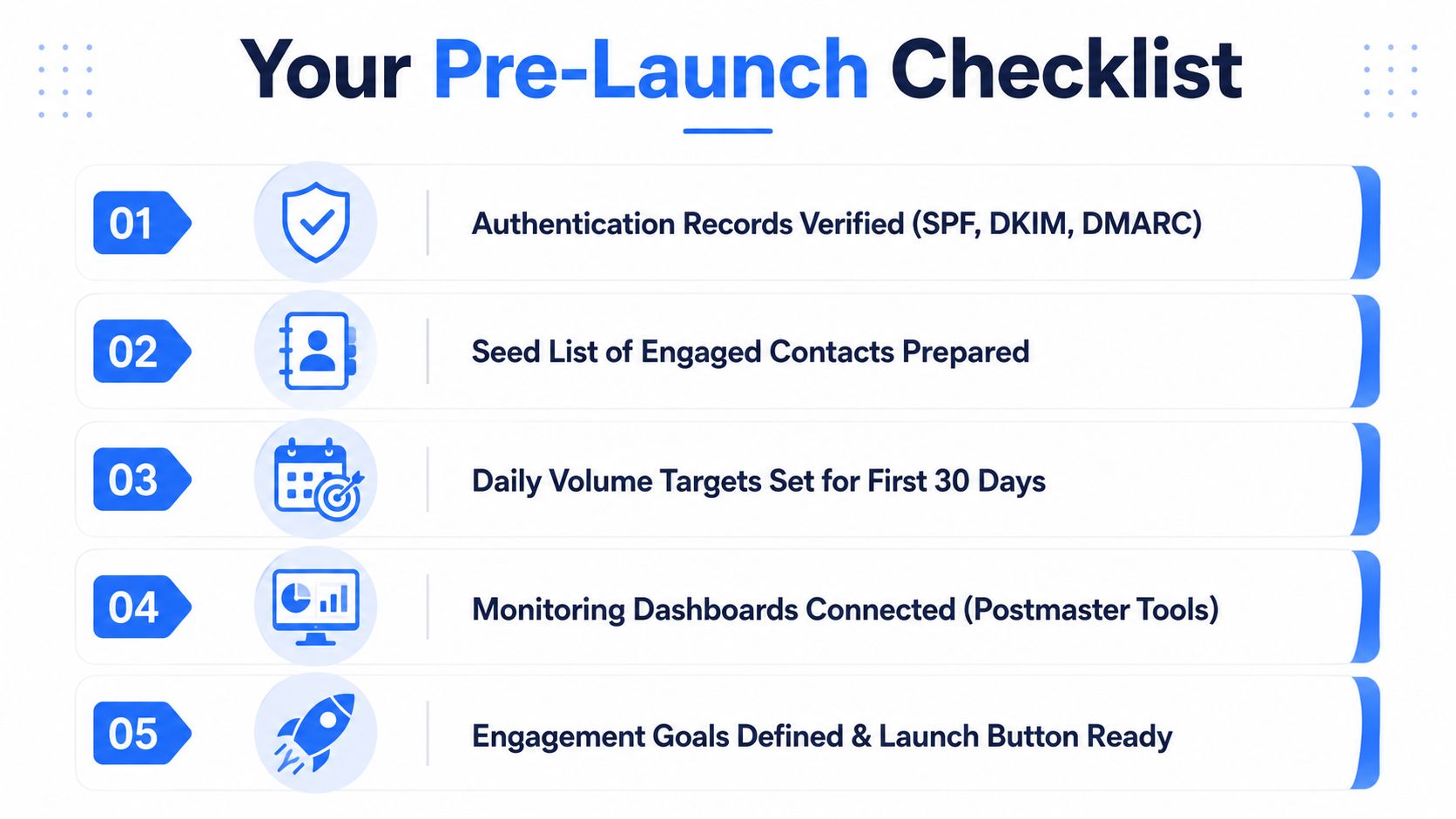
A clean launch starts with a checklist, not memory. Before volume goes up, the domain should already be authenticated, the seed audience should be selected, the monitoring tools should be connected, and the first send targets should be written down. If your team needs a parallel reference for the setup work, the email authentication checklist for e-commerce reinforces the same authentication-first discipline from a different operational angle.
Launch only when the signals line up
Warm-up is finished when the domain shows stable engagement and inbox placement, not when a calendar date arrives. The clearest trigger set is practical, open rates above 20%, spam complaints below 0.1%, consistent inbox placement across Gmail and Outlook for two consecutive weeks, and no blocklist hits. Those signals show the domain is no longer earning trust through cautious behavior alone, it has started to look like a credible sender.
The handoff to live campaigns should stay conservative. Keep cadence steady, then raise volume by no more than 20% per day while the full campaign is still under observation. If engagement drops during that handoff, slow down before the new pattern becomes the sender reputation. That trade-off matters because the cost of pushing too early is often a longer recovery later, and the expected pipeline return is easiest to judge before the ramp with a Lead Printer ROI calculator.
Final pre-launch check
- Authentication records verified: SPF, DKIM, and DMARC are passing.
- Seed list prepared: The first audiences are engaged and recent.
- Daily volume targets set: The send plan is documented for the first month.
- Monitoring dashboards connected: Postmaster and SNDS are live.
- Engagement goals defined: Everyone knows what “healthy” looks like before launch.
A domain does not become safe because it survived a few sends. It becomes safe because it kept earning the right signals long enough for inbox providers to trust it.