A 2026 cross-provider benchmark found an average email deliverability rate of 83.1% across 15 ESPs, which means 16.9% of legitimate email didn't reach the intended inbox. Of that lost volume, 10.5% landed in spam and 6.4% never arrived at all, which is why “sent” and “delivered” are not the same thing, and “delivered” still doesn't mean seen. If you run outbound at scale, that gap is where pipeline disappears.
The practical shift is simple, inbox placement is the target. A campaign can look healthy on sends and still underperform if mailbox providers route a meaningful share to spam or block it outright, which is why I treat deliverability as an operating discipline, not a one-time setup task.
For a useful companion guide on the outbound side of the house, cold email best practices for sales teams is worth keeping nearby because the same infrastructure mistakes tend to show up there first. If you want to benchmark your own program against a broader operating model, the patterns here also map closely to what teams build when they standardize around Lead Printer's outbound approach.
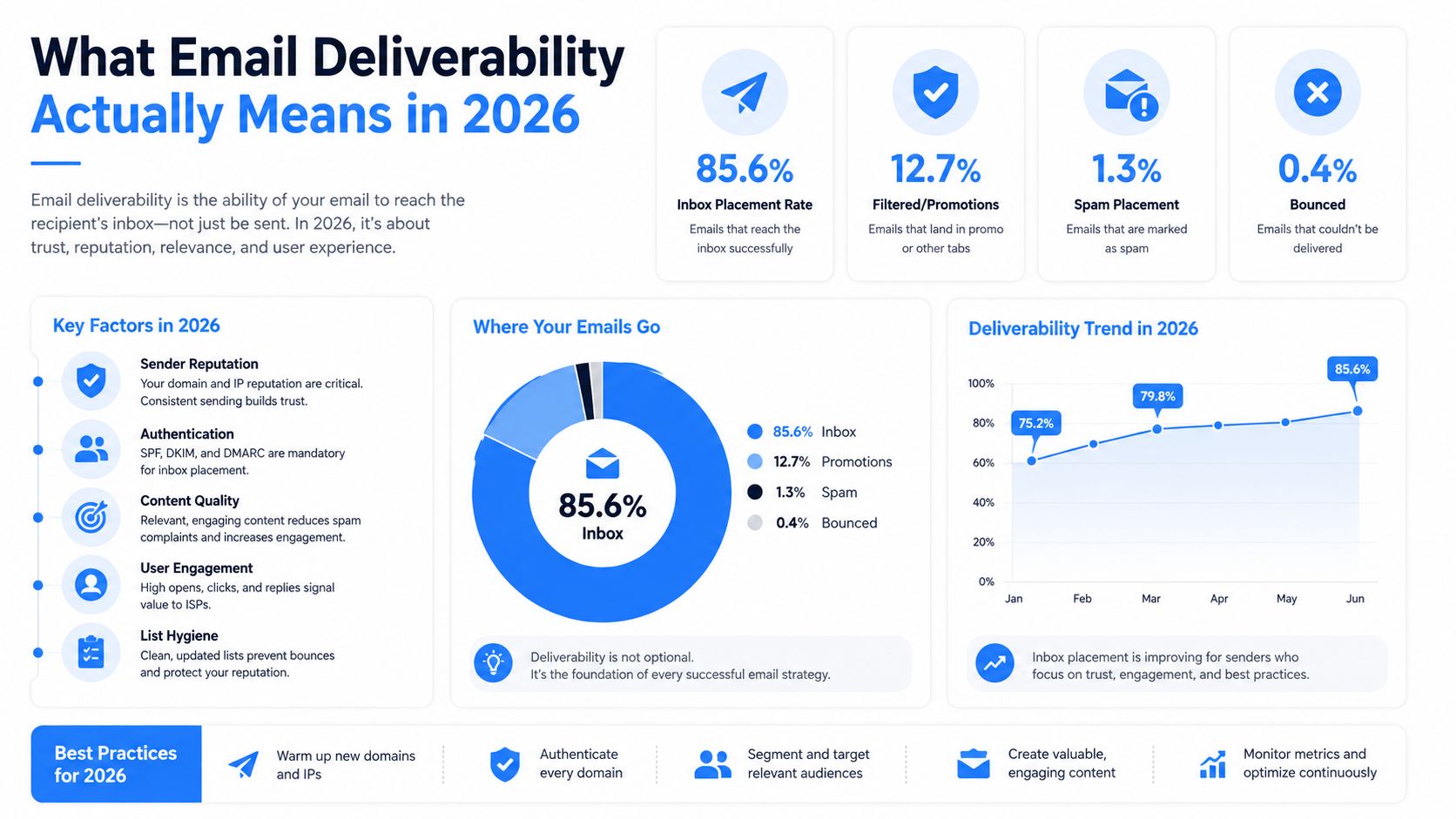
What Email Deliverability Actually Means in 2026
Deliverability is the share of messages that land where a human can see them. That sounds obvious until you look at dashboard language, because many teams still use delivery rate as if it were the same thing, when it only tells you whether the receiving server accepted the message.
The more useful mental model is a funnel. You send a message, the server accepts it, mailbox providers score it, and only then does it land in the inbox, spam folder, promotions tab, or nowhere at all. The 2026 cross-ESP benchmark showing 83.1% average delivery rate, with 10.5% of legitimate mail sent to spam and 6.4% undelivered, makes the point brutally clear, healthy sending volume can still translate into weak human reach. Email deliverability statistics benchmark
Practical rule: if you only track send volume and replies, you're flying blind on the step that decides whether prospects ever had a fair chance to read you.
What inbox placement really changes
Inbox placement affects more than opens. It changes whether the campaign gets a chance to accumulate engagement, and that engagement is what mailbox providers use to judge the next send. That's why a weak week can snowball into a worse one.
The same benchmark also gives you working thresholds. Above 89% is considered good, and above 95% is excellent. Those aren't vanity labels, they're operational guardrails that tell you whether the program is stable or leaking.
What good operators watch instead
Good operators stop asking, “Did we send?” and start asking three sharper questions. Did the mail authenticate cleanly, did it land in the inbox, and did enough of the right people engage to keep reputation intact? That sequence is the difference between a campaign that scales and one that gets throttled.
This is why deliverability belongs in operations, not just copy review. If you don't own the infrastructure, list quality, and remediation loop, you're relying on luck with a very expensive channel.
Authentication as the Technical Foundation
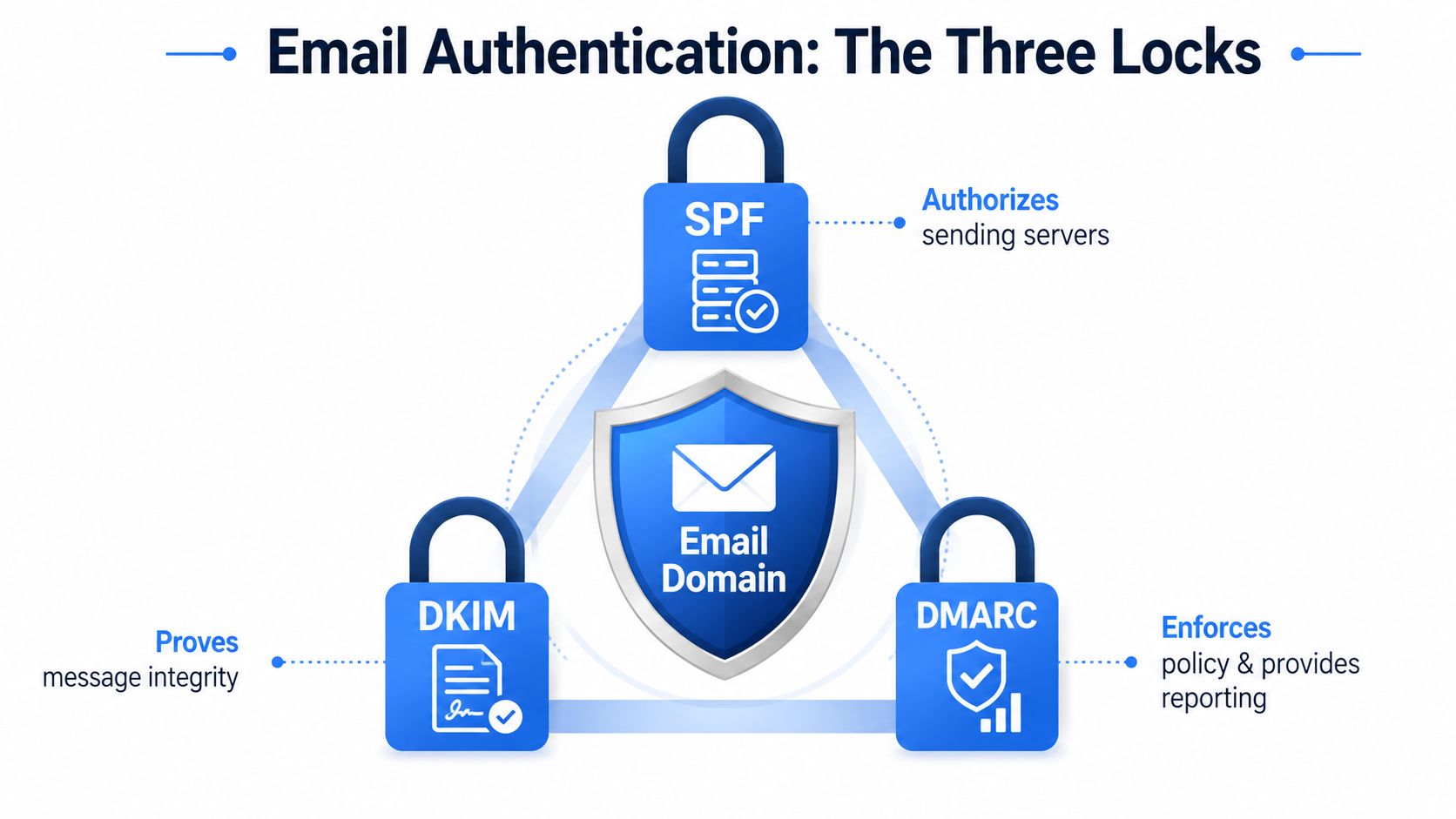
Mailbox providers want proof that you're allowed to send, that the message wasn't altered, and that the visible From domain matches the authenticated domain. SPF, DKIM, and DMARC are the three layers that establish that proof, and they work as a system, not as separate boxes to tick.
SPF says which sending sources are authorized to use the domain. DKIM signs the message so the receiving server can verify integrity. DMARC tells the provider what to do when alignment fails, and whether the message should be monitored, quarantined, or rejected. Mailgun and Adobe both treat all three as required authentication layers, and MessageFlow notes that DMARC should be enforced rather than left in monitoring mode. Mailgun deliverability guidance
Alignment matters more than presence
Having the records present isn't enough if they don't align. A message can carry authentication markers and still fail the policy check if the From domain, signing domain, and sending infrastructure don't match up the way mailbox providers expect. That's where reputation damage starts.
For modern bulk sending, the safer path is a staged rollout. Start with p=none so you can observe traffic, move to p=quarantine once your legitimate sources are behaving, and only then move to p=reject. That sequence gives you room to catch misalignment before it becomes a deliverability problem at scale. If you're setting this up for a B2B sending program, the same logic applies before you scale traffic from a domain used by LeadPrinter for B2B SaaS outreach.
Start strict enough to see problems, but not so strict that you lock yourself out of your own mail stream while the team is still wiring it up.
A useful sanity check before volume grows
If you're unsure whether your domain is ready, a free DMARC checker can help you spot obvious gaps before you push more traffic through the same pipes. That's not a replacement for operational discipline, it's just a fast check that keeps preventable mistakes from turning into a reputation event.
When this layer is done well, it gives every mailbox provider the same signal, this sender owns the domain, signs mail correctly, and enforces policy consistently. That's the baseline before content, segmentation, or volume can do any work.
A visual of the three-lock model is below, and it's the right way to think about the stack.
Warm-Up and Sending Volume Discipline
A new inbox is a stranger to Gmail and Microsoft until it earns trust, and trust is built through pattern, not enthusiasm. I've seen teams wreck a fresh setup by sending too much too soon, then spend weeks pretending the problem is copy when the core issue is volume discipline.
The current guidance is more concrete than one might realize. Start new mailboxes at roughly 5 to 10 emails per day, then ramp slowly, and keep steady-state volume under 50 emails per mailbox per day. That ceiling matters because each mailbox is a reputation container, and once you exceed what it can carry, throttling and spam placement start showing up fast. Prospeo deliverability best practices
How I think about ramping
Warm-up works because providers look for stability. If a mailbox sends a tiny trickle one day and a surge the next, the pattern looks unnatural, even if the content is fine. The point is not to “beat” filters, it's to remove the signal that says you're behaving like a spam operation.
That means your early days should mix low-risk warm-up traffic with real outbound, but with restraint. Keep the mailbox active, keep the cadence predictable, and avoid dramatic jumps in daily sends. The goal is to create a normal-looking sending history before you ask the account to carry real sales load.
A simple decision rule
If the mailbox is new, treat volume as a deliverability variable, not just a productivity lever. One rep sending 40 well-targeted emails from a warmed mailbox is usually safer than three reps trying to cram the same volume through a half-prepared domain cluster.
That's why I push teams to build around mailbox capacity instead of campaign ambition. The capacity of the infrastructure sets the pace, and ignoring that ceiling is one of the fastest ways to turn a clean domain into a filtered one.
For agencies that manage multiple clients, the same logic applies at the portfolio level, which is why Lead Printer's agency workflow style of structured ramping is so relevant to outbound operators who can't afford to relearn the same lesson every quarter.
List Hygiene and Audience Segmentation
Copy rarely saves a dirty list. Once authentication and warm-up are in place, list quality becomes the main lever that decides whether campaigns keep reaching inboxes or slowly degrade under bounce and complaint pressure.
The practical thresholds are straightforward. Keep hard bounce rates below 2% and spam complaint rates below 0.1%. Mailbox providers treat bounces and complaints as evidence that your list is stale or your targeting is unwelcome, so repeated violations hit sender reputation directly. Those are not soft targets, they define the operating floor. MessageFlow deliverability guide
The list rules that actually protect reputation
Clean lists are not just about removing obvious bad addresses. They are about building suppression logic that keeps you from sending to contacts who already said no, contacts who never engaged, and contacts whose addresses were never valid in the first place.
- Verify before send: use validation before first contact so bad records never enter the sending stream.
- Suppress hard bounces permanently: every retry tells providers you do not control list quality.
- Remove unsubscribes immediately: keep suppression synced across every mailbox and campaign.
- Segment by engagement: recent clickers and responders deserve different treatment from cold records.
- Handle role accounts carefully: keep them out unless you have a very specific reason to include them.
Teams that suppress engaged contacts alongside inactive ones often see reply rates drop by 30% or more. The problem is usually sloppy segmentation, not the offer itself.
A practical sourcing layer helps too. If your team is building prospects from scratch, a B2B email data extraction tool can support cleaner list creation when it is used to enrich and verify targeted records instead of spraying broad, low-fit contacts into outbound.
Why segmentation beats blanket sending
Segmenting by engagement does more than improve response rates. It protects the reputation of the sending domain. When recently active contacts get the right message, they are more likely to interact. When inactive contacts are removed or suppressed, they stop dragging down your averages.
Deliverability improves when you make the send set smarter, not when you make the whole list bigger.
Content Hygiene Beyond the Copy Itself
Subject lines matter, but content hygiene is bigger than the first line. Mailbox filters look at structure, links, HTML balance, and patterns that resemble mass abuse, which means the surrounding mechanics of the email can hurt you even when the offer is legitimate.
Promotional subject lines usually fail because they scream urgency without earning it. Overly salesy phrasing, aggressive punctuation, and broad claim language can all make the message look disposable before anyone reads a word of body copy. The safer move is to write like a person reaching out to a person, not like a flyer trying to sound enthusiastic.
The structural signals that get scored
A few simple patterns still cause avoidable damage.
- Too many links: every extra destination adds scrutiny, especially when they all point to the same place or are shortened.
- Image-heavy layouts: a message that is mostly image looks more like an ad or a flyer than a normal business email.
- Thin HTML-to-text balance: filters notice when there's almost no real text supporting the message.
- Spam-trigger phrasing: words that have been abused at scale can still contribute to a poor score when paired with other red flags.
The fix isn't to strip personality out of the message. It's to make the email look structurally normal. Plain text still performs well for many outbound programs because it reads like a direct note, not a designed asset.
What I tell copywriters
Write for clarity first, persuasion second. Keep the message short enough that the offer is obvious, make the link count feel necessary, and avoid trying to game open rates with bait-and-switch subject lines. The mailbox provider is scoring the package before the recipient ever decides whether it's interesting.
The teams that get this right usually stop obsessing over “spam words” as a list and start thinking in terms of message shape. That shift is a lot more useful than memorizing a banned-word spreadsheet.
Monitoring With Postmaster Tools and SNDS
The first warning signs rarely show up in replies. They show up in the dashboards first, and by the time prospects start complaining, the reputation problem has usually been building for a while.
Gmail Postmaster Tools and Microsoft SNDS are the two signals I check most often in B2B outbound. Gmail's setup matters because it shows compliance status, while Microsoft gives you visibility into IP reputation and complaint-related behavior. If your team is not watching both, you are guessing about inbox health instead of managing it.
What to watch and when
Daily, I watch volume, bounce behavior, and reply patterns. Weekly, I review the reputation dashboards, complaint trends, and DMARC reporting so I can catch slow deterioration before it turns into a hard block. That cadence matters because small shifts usually appear before major ones.
A common warning pattern is easy to miss. Reply rate stays flat, inbox engagement softens, complaints or bounces start to creep up, and only later do you see real filtering pressure. If you only look at the final outcome, you have already missed the warning window.
How to read the decline
A single bad send does not tell you much. Trend direction does. If reputation is drifting, the fix usually starts with stopping the source of the drift, not waiting for the problem to self-correct. That is why these dashboards are early-warning systems, not reporting decorations.
Track the signals that change first, not the metrics that make the quarterly slide look pretty.
Good teams wire alerts around the metrics that tell the truth fastest. Bad teams wait for a campaign to fail visibly, then try to debug the mail stream from the wreckage.
Remediation When Reputation Slips
When deliverability breaks, the wrong instinct is to tweak the subject line and hope the next send recovers. The first move should be triage, because reputation issues usually have a specific trigger, and the trigger is often close to the last change your team made.
Start with authentication, recent volume shifts, complaint behavior, and any list source that changed before the problem appeared. If a new segment, a fresh mailbox, or a sudden ramp coincided with the drop, that's probably where the fault lives. Fixing the visible symptom without isolating the cause just lets the same issue come back.
The order I use in practice
- Check authentication first. If SPF, DKIM, or DMARC alignment is broken, there's no point optimizing the copy.
- Pause the source of damage. Suppress the offending segment, slow the mailbox, or halt the domain that's sending the worst signal.
- Review volume changes. Look for abrupt increases, mailbox overload, or a sending pattern that no longer looks human.
- Watch recovery, not just resend. Reputation comes back through stable, lower-risk sending, not through brute force.
A domain pause is usually the right call when the problem is broad and tied to the sender identity itself. Mailbox rotation is better when the damage is isolated to a specific inbox or stream, but it won't save a domain that's already thoroughly compromised. If the entire program has become noisy, retire the damaged asset rather than trying to nurse it through one more campaign.
What recovery really looks like
Recovery is slow because mailbox providers need to see a clean pattern before they trust you again. That means low-risk sends, stable cadence, and only the segments that are most likely to engage. If you can't produce that pattern, you're not ready to scale back up.
The mistake I see most often is impatience. Teams want the old volume back before the reputation is rebuilt, and that's exactly how they reset the damage.
A 90-Day Deliverability Operating Cadence
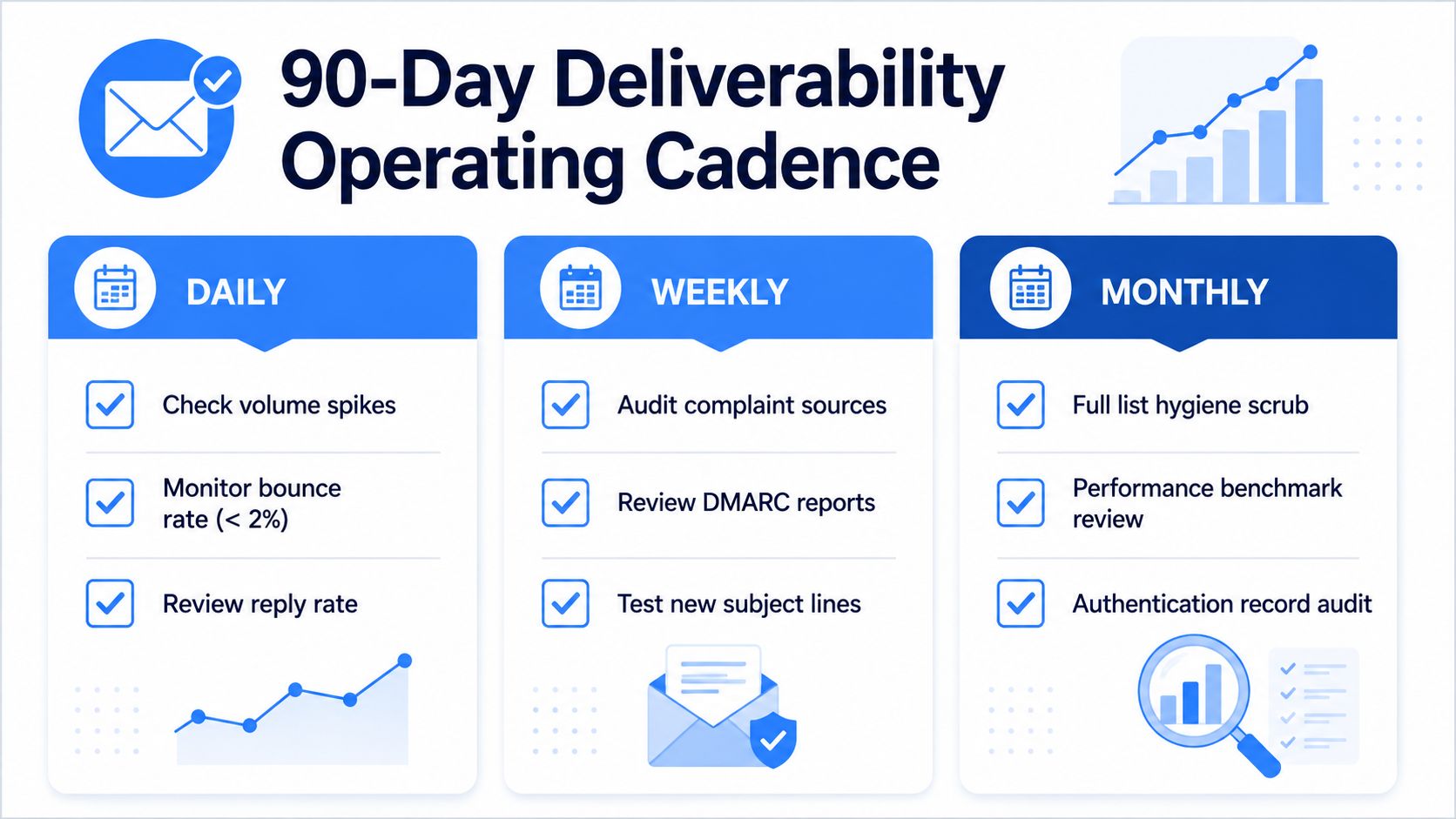
Deliverability holds when someone owns it every week, not when the setup team finishes a project. The easiest way to keep it healthy is to turn it into a rhythm with daily, weekly, and monthly checks that don't depend on memory.
Daily work
Keep the daily view tight. Check for sudden volume spikes, scan bounce behavior, and review replies from the segments that matter most. If one mailbox or one sequence behaves differently from the rest, that's usually the earliest sign that something needs attention.
Daily checks don't need to be long. They need to be consistent, because consistency is what catches drift before the provider does.
Weekly work
Use the weekly review to handle the things that age more slowly. Audit complaint sources, inspect DMARC reporting, and compare this week's performance with last week's sending pattern. That's where you catch the hidden damage from a bad list batch or a mailbox that started overperforming on volume but underperforming on reputation.
This is also the right moment to test new subject lines and content structures, because you're comparing them against a stable operating baseline. If everything else is changing at once, you won't know what caused the shift.
Monthly work
Monthly is where you reset the system. Run a full list hygiene scrub, review performance benchmarks, and audit authentication records so you know nothing has drifted out of alignment. New domains should also get fresh warm-up cycles when they're introduced, not whenever someone feels pressure to “just send more.”
The cleanest programs don't win because they're clever. They win because they're boring to maintain and hard to break.
That's the point of the cadence. Deliverability becomes durable when the team treats it like infrastructure, not a rescue job.
If your team is tired of watching good campaigns get buried by weak infrastructure, Lead Printer can help you build the sending setup, list discipline, and outbound cadence that keep mail in the inbox and meetings on the calendar. Visit Lead Printer if you want a team that runs deliverability like an operating system, not a checklist.