You know the feeling. The calendar is lighter than it should be, inbound is slowing, and the team keeps saying LinkedIn should help, but most of what shows up there looks like busywork, not pipeline. That's usually the point where people either start blasting connection requests or give up on the channel entirely.
Both moves miss what LinkedIn is in 2026. It's not a networking hobby, and it's not a standalone silver bullet. It's one node in a multichannel outbound system, and the teams that win use it to identify, qualify, and route buyers fast enough that interest doesn't decay before sales ever sees it.
Why LinkedIn Now Runs the B2B Pipeline
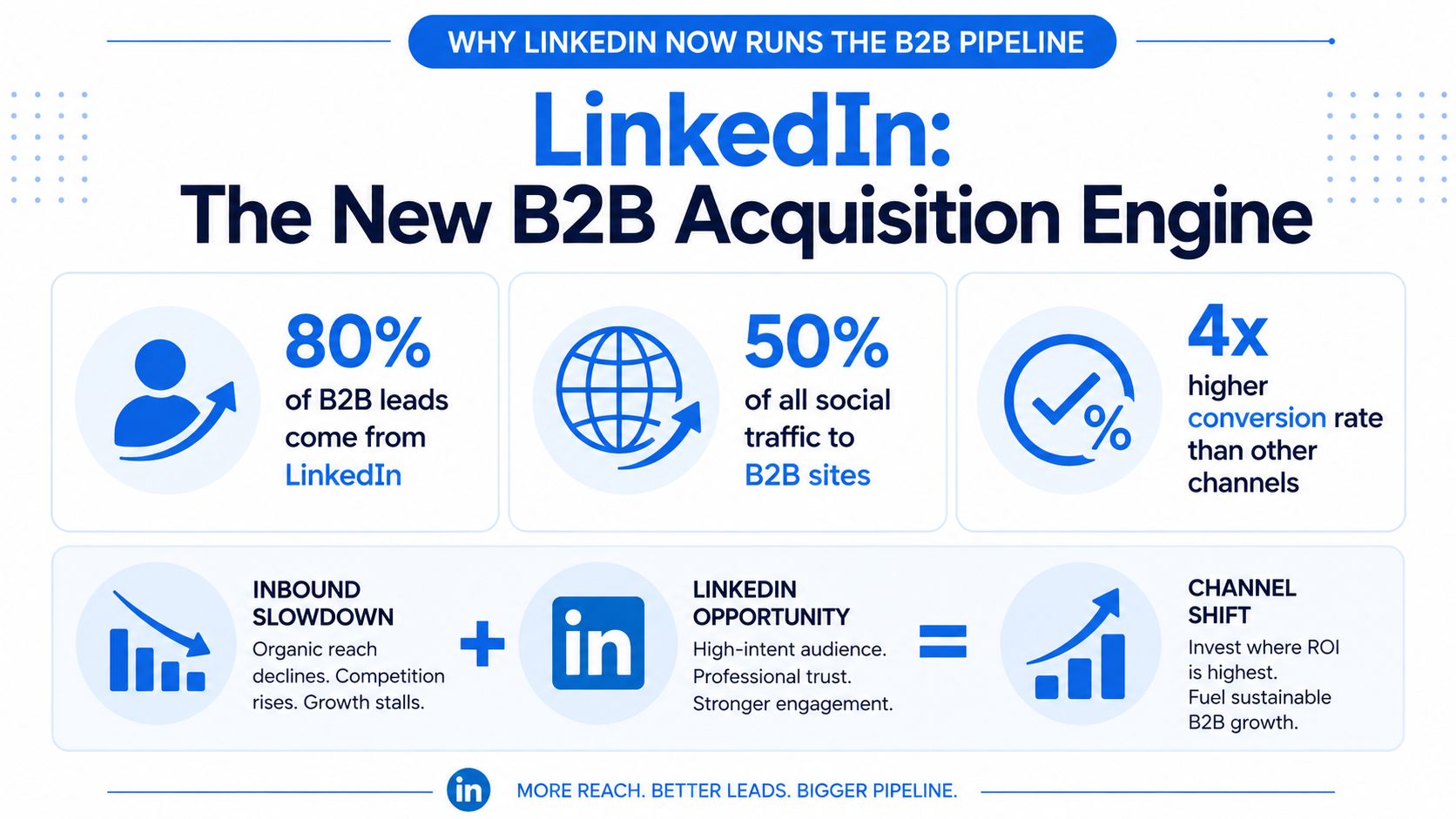
The reason LinkedIn keeps showing up in pipeline reviews is simple: it's where B2B buyers already are. Recent 2025-2026 benchmark roundups report that LinkedIn generates about 80% of all B2B social media leads, and 89% of B2B marketers use LinkedIn for lead generation while 62% say it produces leads for them. The same benchmark set says 40% of B2B marketers call it the single most effective channel for high-quality leads, which explains why sales teams keep circling back to it even after trying every new outbound trend. Those figures come from LinkedIn marketing statistics.
That concentration changes how operators should think about the channel. If a platform accounts for that much social lead share, it stops being “another place to post” and becomes a real acquisition surface for SaaS, professional services, and manufacturing teams that need consistent conversation volume. The value isn't just audience size, it's the combination of role data, company data, and visible career context that makes targeting much cleaner than on most other social channels.
A lot of teams still treat LinkedIn like a prestige layer on top of email. They polish profiles, send requests, and hope someone notices. That's weak execution. The stronger approach is to treat every profile visit, connection acceptance, and content reaction as input to a controlled system, then route it into CRM and follow-up before the lead cools.
Practical rule: LinkedIn works best when it's handled like infrastructure, not inspiration. The profile, list, cadence, message, and handoff all have to fit together.
The practical version of that mindset shows up in playbooks like the RedactAI approach to LinkedIn leads, which is useful precisely because it treats the channel as a repeatable process rather than a one-off outreach trick. For a more productized view of how outbound systems are framed in B2B SaaS, the internal Lead Printer B2B SaaS page fits the same logic, process first, message second.
Optimizing Your Profile and Sales Navigator Setup
Your profile is the landing page that prospects inspect before they ever reply. If it looks generic, the rest of the system leaks. A vague headline, a stock banner, and a summary that talks about “passion for growth” don't help a buyer understand why they should accept a request from you.
Make the profile answer three questions fast
The headline should tell a buyer who you help, what you help them do, and why that matters. The about section should reinforce that with proof points and audience-specific language, not a biography. Featured content should give a prospect one clear next step, whether that's a case study, a relevant guide, or a short offer that matches the ICP.
A weak profile sounds like this, “Helping businesses grow through strategic solutions.” A stronger one is narrower, for example, “Helping SaaS teams book qualified demos from outbound and LinkedIn.” The second version gives the reader a reason to continue, because it signals fit instead of trying to please everybody.
The same logic applies when you're researching prospects. If you need a tool for scraping LinkedIn profiles, use it to support a pre-defined ICP, not to spray names into a spreadsheet and hope the list becomes useful later. Scraped data is only valuable when it reinforces segmentation, routing, and follow-up.
A profile shouldn't try to impress everyone. It should make the right buyer feel like they've already found the right operator.
Sales Navigator is where that operator logic turns into repeatable prospecting. Build saved searches around the fields that matter for your segment, then keep account lists tight enough to review without friction. The goal isn't more names, it's cleaner signal. If you're selling into SaaS, services, or manufacturing, you need the profile and the search setup to point in the same direction or the channel turns noisy fast.
Building a Hyper-Targeted Prospect List
Most LinkedIn outreach fails before the first message goes out. The list is wrong, so the reply rate never had a chance. Job title alone doesn't tell you whether someone can buy, influence, or merely sit in the room when a decision gets discussed.
Stack filters until the list reflects buying power
Start with the ICP, then layer job function, seniority, company size, geography, and relevant company attributes. The point is not to collect everyone who could plausibly be interested. The point is to collect the few people who fit the actual buying motion. That means excluding broad segments that inflate volume but weaken response quality.
For agency and service workflows, the internal Lead Printer agencies page is a useful reference point for how tightly segmented outbound motions are usually organized. The same principle applies here. If a list can't be explained in one sentence, it's probably too broad.
A clean prospect list usually has a few traits:
- Role alignment: The contact has enough authority or proximity to the decision.
- Company fit: The account sits in the size and market band you can serve.
- Trigger relevance: The lead has a reason to care now, not eventually.
- Message compatibility: The list can support one sharp angle instead of five watered-down ones.
Weekly refreshes matter more than people admit. New hires, promotions, and company changes create fresh context, and stale lists waste good outreach. If you're running both LinkedIn and email, build once and reuse the same segment across channels so your LinkedIn motion and downstream sequencing don't drift apart.
The biggest mistake is over-optimizing for list size. A smaller list with a clear pattern will usually outperform a broad one that forces generic copy. That's not a theory, it's what happens when operators stop treating prospecting as a data dump and start treating it as an account-selection exercise.
Setting a Cadence That Protects Your Account
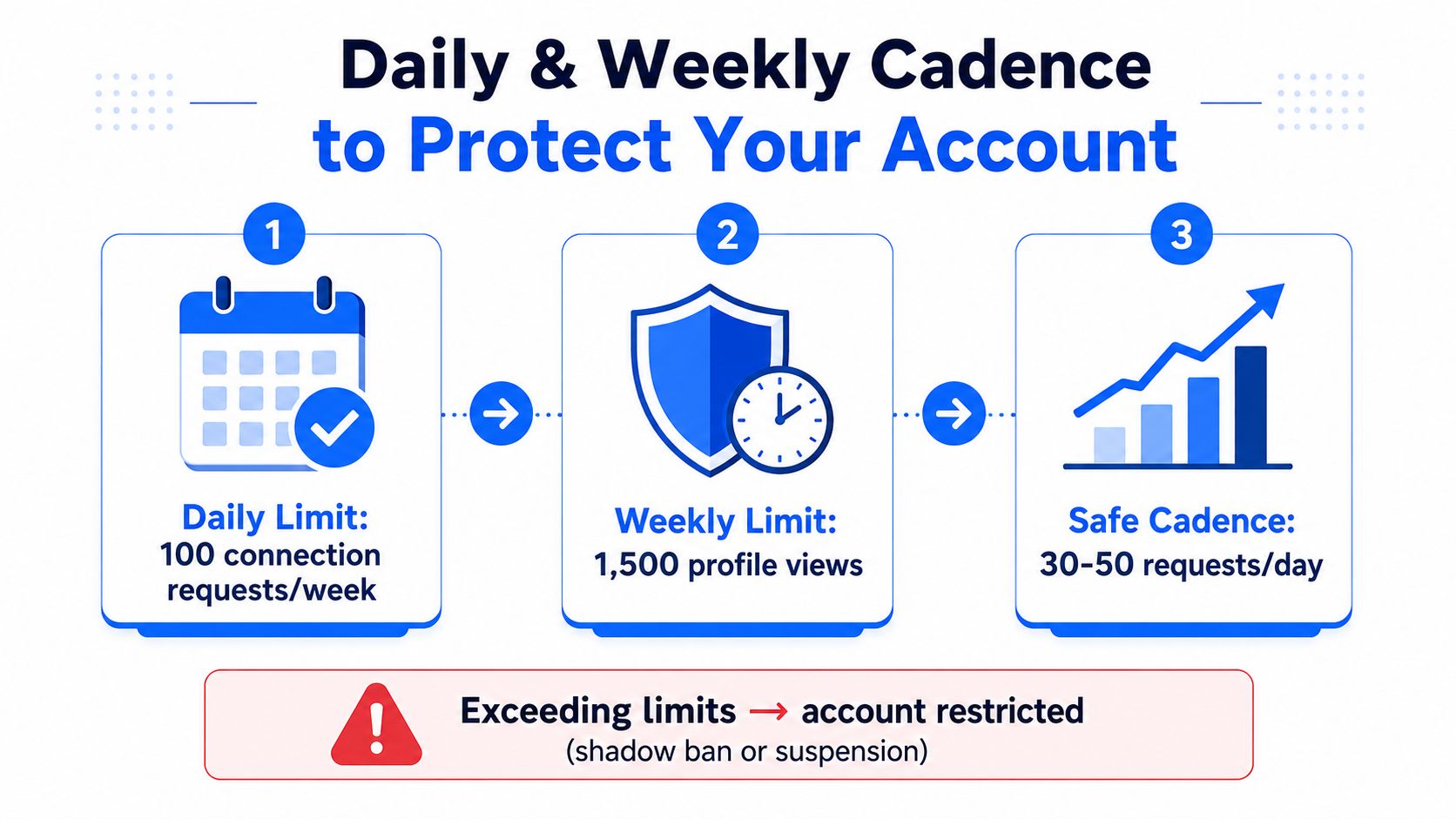
LinkedIn itself recommends a controlled pace of 200 connection requests per week, broken into roughly 50 requests Monday through Thursday or 175 on Monday if time is limited. That's the benchmark to respect, because the platform rewards consistency far more than bursty volume. The practical meaning is obvious, send too much too fast, and you stop looking like a genuine sender.
Run requests like a weekly production line
The safest motion is simple. Keep request volume steady, spread activity across the week, and avoid the temptation to batch everything into one frantic session. Pair requests with light engagement like profile views, post reactions, and occasional comments so the account doesn't feel like a cold automation layer.
Practical rule: Consistency beats spikes. A stable sender profile can run for months, a reckless one gets noisy fast.
One thing most operators get wrong is assuming all activity has equal risk. It doesn't. Generic connection spam creates weak acceptance, and weak acceptance makes every later message less believable. A slower, more selective cadence usually outperforms because accepted requests come from people who match the list.
This is also where a second sender starts to make sense. Not to double down on volume blindly, but to separate segments or regions once the first motion is stable. That keeps one profile from carrying all the load and lets you test positioning without changing the entire system at once.
Writing Messages That Earn Replies
Bad LinkedIn messages usually fail in the first two lines. They open with a pitch, not a reason. A prospect who has no context for why you reached out won't reward you for being “concise” if the message still feels generic.
What a usable first message looks like
A strong opener usually has three pieces. It starts with a context hook, adds one observation that proves the message wasn't copied from a template, and ends with a small ask that's easy to answer. That's enough. Anything longer tends to read like a meeting request in disguise.
A generic pitch sounds like this, “We help companies improve pipeline. Would you be open to a quick chat?” It's safe, but it gives the buyer no reason to respond. A role-based version is better, “Noticed you're leading demand gen at a SaaS team, curious how you're handling LinkedIn outbound alongside email right now.” That at least ties the message to the job.
A signal-based version is stronger still, “Saw the team recently expanded in the EMEA market, and that usually changes how prospecting gets routed. Are you handling those leads in one sequence or splitting them by region?” The message works because it points to a real shift and asks a question that invites a practical answer.
After acceptance, don't rush into a meeting request. Send the first follow-up only when you have something to build on, usually a short acknowledgement plus a question that keeps the conversation moving. If the prospect goes silent, stay brief. A short nudge beats a wall of value statements every time.
The lines to cut are easy to spot. Long introductions, big promises, and meeting CTAs in message one usually drag reply quality down. The lines to keep are specificity, brevity, and a question that gives the buyer an easy way to answer without committing to anything too early.
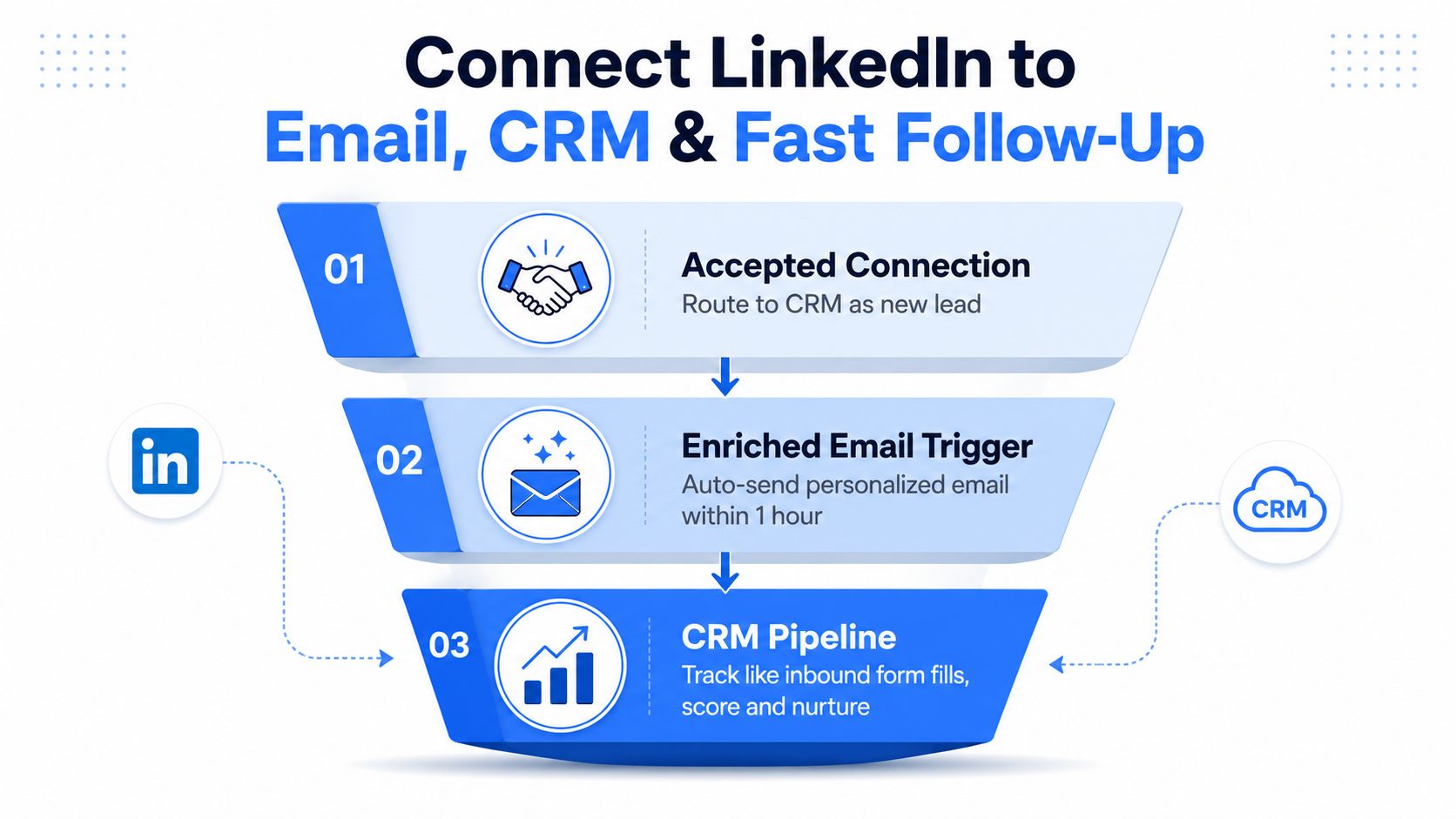
Connecting LinkedIn to Email, CRM, and Fast Follow-Up
LinkedIn leads decay fast when they sit outside the rest of the system. Accepted connections, profile views, and lead form submissions need to land in the same operational path as inbound leads, or sales ends up working from stale signal. Most guides go soft here, stopping at messaging and never explaining what happens after the click.
Route the signal before it goes cold
As soon as a connection is accepted, it should enter CRM with the same discipline as an inbound form fill. That gives the team a place to score, segment, and assign the lead without hand-copying data from one tool to another. If the profile context shows a clear fit, a personalized email sequence should trigger quickly, while the interaction is still fresh.
Another useful layer is retargeting. People who opened a form but didn't submit, or viewed a profile but didn't reply, can be reintroduced through later touches instead of being forgotten. That's a significant advantage of treating LinkedIn as one node in a multichannel outbound system; it gives you multiple chances to convert the same buyer without restarting the conversation from zero.
The best follow-up isn't clever. It's fast, relevant, and routed to the right place before the lead cools off.
If you need to benchmark the reporting side, LinkedIn analytics tools are worth comparing because they force the team to look at more than vanity activity. The useful metrics are the ones that connect social activity to downstream motion, not just profile views or follower counts.
The handoff should be simple enough for an ops team to maintain. Accepted connection goes to CRM, enrichment fills in missing details, email sequence fires, and sales gets the lead while the context is still current. That structure matters more than polished copy because speed and routing often determine whether a LinkedIn signal turns into a meeting or disappears into the noise.
Your 30-Day Rollout and What to Measure
Start with setup in week one, list building in week two, routing and email sequencing in week three, and a review in week four. That gives the motion time to stabilize without turning it into a six-month project. The numbers to watch are acceptance rate, reply rate, qualified conversation rate, and meetings booked.
The easiest way to avoid self-deception is to ignore connection count as a success metric. Use the reporting stack to see which segments create conversations, then prune the rest. If you want a practical way to frame the business case, the Lead Printer ROI calculator can help teams translate activity into pipeline language before they scale the motion.
If acceptance drops, the list is probably too broad or the sender looks too promotional. If replies stall, the message may be too abstract or the follow-up too slow. If the account starts to feel fragile, reduce volume and tighten targeting before adding anything else.
Lead Printer builds the infrastructure behind multichannel outbound, including prospecting, data enrichment, LinkedIn-assisted list building, and routing into email sequences and CRM. If you want LinkedIn lead generation to feed real pipeline instead of isolated activity, visit Lead Printer and see how the system is built around qualified leads, fast handoff, and measurable follow-up.