
You're probably staring at a Clay table that started as a quick experiment and now feels like a second job. The list is half-clean, the enrichment columns are expensive to run, and every “personalized” email still sounds a little too generic. That's the point where Clay lead generation either becomes real infrastructure or turns into another ops pile you keep promising to clean up on Friday.
Clay began in Brooklyn in 2017 as a no-code spreadsheet for connecting information and automating work, and the company says it has since raised $115M at a $7.1B valuation while serving more than 17,000 customers as of 2026 (Clay about page). That scale matters because it shows what Clay has become, not just what it started as. It's no longer just an enrichment tool, it's a place where teams build sourcing, verification, scoring, and routing into one system.
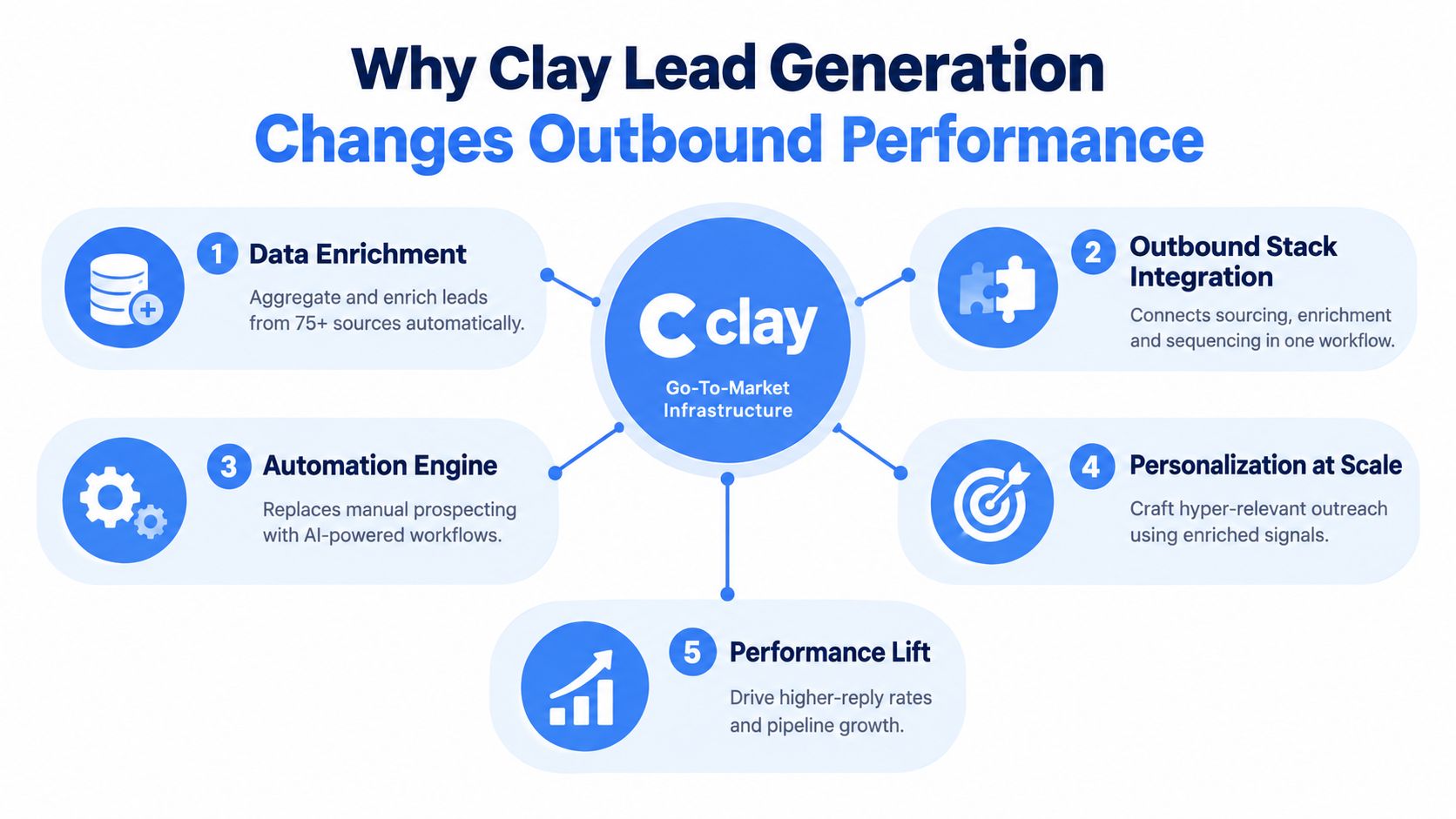
Why Clay Lead Generation Changes Outbound Performance
The first time Clay feels useful, it is usually because a team is tired of doing research by hand. One rep exports a LinkedIn search, another checks company websites, someone else verifies emails in a separate tool, and by the time the list is ready, half the signals are already stale. Clay changes that motion by acting as GTM infrastructure. It handles sourcing, enrichment, scoring, and routing in one place, which matters when pipeline quality depends on fresh inputs rather than more manual effort.
Clay started as a no-code spreadsheet for connecting information and automating work, and the company says its growth reflects a shift from workflow tool to outbound system (Clay about page). An independent company breakdown reports rapid revenue growth across multiple periods, along with a larger user and customer base, which helps explain why teams keep moving away from point solutions (Clay company breakdown). The useful part is not the scale itself. It is the signal that operators want one table where sourcing, verification, and routing stay connected.
What Clay replaces and what it doesn't
Clay is strongest upstream of sending. It can organize source data, run enrichment waterfalls, score records, and keep lists fresh so downstream tools are not working from blind or outdated inputs. It does not replace a sender, and it will not repair a weak ICP or sloppy copy.
A better way to judge it is by operating cost. If your team is already running multiple enrichment tools, manually refreshing accounts every week, and hand-checking record quality before launch, Clay can reduce the number of disconnected steps. If your list is broad, your qualification rules are fuzzy, or nobody owns QA, the table will still produce weak pipeline.
That is the trade-off. Clay helps teams build a repeatable system for outbound, but the setup work only pays off when the data foundation, scoring logic, and refresh cadence are solid. It can be overkill for small teams that only need a basic list and a sender. It becomes worth the overhead when you need cleaner sourcing, tighter segmentation, and a process that keeps up with changing signals.

Planning Your Ideal Customer Profile and Data Foundation
Bad Clay setups usually fail before the first enrichment runs. The table is too broad, the fields are duplicated, and nobody agreed on what a qualified account looks like. A clean Clay build starts with a narrow ICP, then a data model that can hold firmographic, technographic, and signal-based filters without becoming a junk drawer.
A useful starting point is a scored ICP model, especially if your team needs a structured way to rank fit before enrichment. The scored ICP model overview is a helpful reference because it frames qualification as a disciplined filter, not a vague description. In practice, that means defining who you want by industry, size, geography, role, and buying context before you touch Clay.
Build the source list before the table gets large
Good source data usually comes from a mix of places, not one magical feed. LinkedIn Sales Navigator is often the cleanest starting point for persona targeting, while Google Maps and business registries are stronger when you need local companies, multi-location businesses, or regional coverage. A website list can work too, but only if the names are already tight enough to justify enrichment.
The structure of the base table matters just as much as the source. Keep one row per company or contact, not both unless you've explicitly designed for that. Add only the columns you'll use for enrichment, qualification, personalization, and routing, because bloated tables chew through credits and create more QA work than many teams expect.
Design fields around qualification, not curiosity
Think in layers. First comes identity, like company name, domain, and primary contact. Then comes fit, such as industry, geography, team type, and tech stack. After that comes signal data, like hiring or competitive context, which only matters if you plan to use it in scoring or messaging.
That same discipline should guide deduplication. If two rows point to the same account, clean them before enrichment. If a field won't change your target decision or your first line, leave it out.
You want a table that can survive weekly refreshes without becoming brittle. If every new column changes the logic of the whole sheet, the model is too messy.
For lead qualification logic, keep the workflow close to your routing rules. The internal guide on lead qualification criteria and process fits well here because the table should reflect who gets sent, who gets scored, and who gets discarded. If the table can't support that decision tree, it's not ready for automation.
Building Waterfall Enrichment and Lead Scoring Inside Clay
Clay stops being a list and starts acting like an operating system for outbound once enrichment, scoring, and refresh rules are connected. The fastest way to waste credits is to enrich every row with every provider in the same order, then hope a score later fixes the mess. A better setup is a waterfall enrichment table, ordered by provider economics, then a scoring layer that removes weak rows before they ever reach outbound. It works best when the table sits inside a managed workflow, not as a one-off spreadsheet, which is why the SleekPost guide to marketing workflow fits the way teams usually have to run this process.
Clay's own outbound guide shows why provider ordering matters. In its example waterfall, Findymail hits 90.26% verified-email success at $0.50, Wiza hits 85.02% at $1.00, Enrow hits 70.94% at $0.20, and Hunter hits 52.87% at $0.40 (Clay outbound guide). The point is simple. The lowest sticker price is not always the cheapest path if it returns fewer verified contacts and sends the row into another lookup anyway.
| Provider | Verified Hit Rate | Cost per Lookup | Best Use in Waterfall |
|---|---|---|---|
| Findymail | 90.26% | $0.50 | First choice when you want the highest verified-contact yield |
| Wiza | 85.02% | $1.00 | Strong backup when you need solid coverage after the first pass |
| Enrow | 70.94% | $0.20 | Lower-cost fallback for broader coverage |
| Hunter | 52.87% | $0.40 | Secondary option when you're filling gaps, not optimizing for top yield |
Order providers for cost per verified contact, not vanity hit rate
A lot of teams evaluate providers in isolation. That usually leads to the wrong waterfall. What matters is the cost to get a usable verified contact, plus how many rows survive your score cutoff. In Clay-based outbound, well-built waterfalls for US mid-market often land around 70–85% enrichment hit rate, $0.08–$0.25 per verified contact, and only 20–35% of sourced rows should make it through a real scoring cutoff.
Operational rule: if a row already has a verified email, stop the waterfall there. Every unnecessary lookup cuts margin and adds QA work.
Conditional enrichments are where the table becomes useful. Set the first provider to handle your best-fit rows, then branch to cheaper or broader sources only when the earlier step fails. That keeps credits pointed at rows that still have a chance to ship.
Score hard, then refresh on a schedule
Scoring should be blunt. Fit scores need to remove bad rows quickly, not produce flattering averages. If your score only trims a small fraction of the list, it probably isn't doing enough to improve outbound.
Clay's guidance also recommends a weekly refresh cadence because stale data drags reply quality down and creates avoidable cleanup work in the next send. Signals decay fast, especially when you rely on hiring changes, role changes, or recent activity. Re-enrich and re-score on a schedule, or the table drifts away from reality and you keep paying to mail old assumptions.
The cleanest build I've seen uses three gates. First, verify contact data. Second, apply the score cutoff. Third, refresh weekly so the table stays close to what your team can route. That setup is the difference between a table that drives pipeline and one that just burns credits.
Connecting Clay to Email CRM and Outbound Sequences
Once the table is clean, Clay should stay upstream. It shouldn't become your sending engine, because deliverability and sequencing belong in tools built for that job. Win is routing enriched rows into your CRM, inbox, and sender without rework.
A practical flow starts with field mapping. Match Clay columns to CRM fields in HubSpot or Salesforce, then push only the fields your team uses for pipeline movement. If you pass too many untested variables downstream, your CRM turns into a duplicate of the spreadsheet instead of a working system.
Then connect the sending layer. Gmail or Outlook handles inboxes, while tools like Instantly or Smartlead manage sequencing and throttling. Clay can feed them variables like tech stack, hiring signals, competitor context, or geography, and those values can shape the first line, CTA, or segment-specific branch.
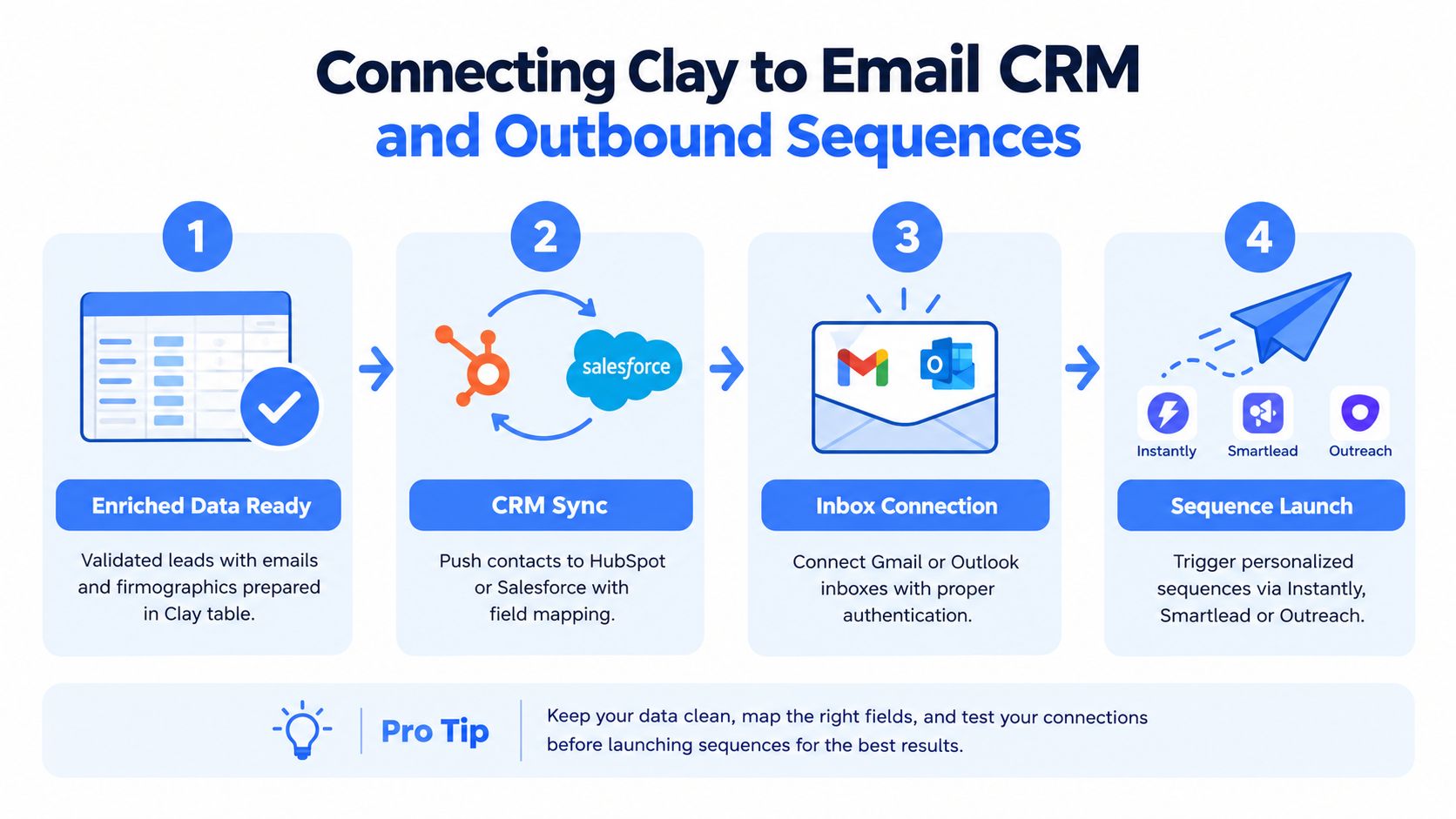
A simple routing pattern that stays sane
- Validated row in Clay. The contact has enough verified data to send.
- CRM sync. HubSpot or Salesforce gets the account and contact fields.
- Inbox connection. Gmail or Outlook is authenticated for sending.
- Sequence launch. Instantly, Smartlead, or a similar sender triggers the right branch.
A short personalization stack usually works better than a clever one. For example, one branch can speak to a company's tech stack, another can reference a hiring signal, and a third can frame the pain point from a competitor angle. The point is to use Clay to provide the facts, then let the sender execute the conversation.
The cold outreach email framework is relevant here because your sequence only works if the message reads like a real human wrote it for a specific account. If the fields are strong, the emails can stay short and still feel relevant.
Keep LinkedIn as a supporting touch, not the center of the machine. Clay can inform the sequence, but the sender still needs to do the actual deliverability work.
For EU markets, localization matters more than many realize. That doesn't just mean translating copy. It means adjusting tone, role framing, and formality so the message doesn't feel imported from a US playbook.
Testing Deliverability and Improving Reply Rates
A lot of Clay teams obsess over enrichment quality and then send through a weak email setup. That usually produces the same frustrating result, clean data with poor inbox placement. Before scaling volume, the sending layer needs authentication, warm-up, and guardrails so your Clay work does not get buried by deliverability problems.
Cold email benchmarks make the target clear. Platform-wide average reply rate is 3.43%, with 5 to 10% considered good and 10%+ excellent, while stricter B2B analyses place strong performance in the 1 to 5% range and 8 to 10%+ at best-in-class levels (Emailchaser cold email statistics). Broad campaigns can collapse to about 0.45% reply rates, which is why list quality matters more than send volume.
What to test first
- Subject lines: Keep them short, plain, and tied to the actual segment.
- First lines: Make sure the opener proves you used the enrichment data.
- CTAs: Ask for a small next step, not a big commitment.
- Segments: Split by persona or trigger so weak messaging does not contaminate the whole list.
Those tests work best when each Clay segment is narrow. If you send one message to everyone, you will not know whether the problem was the source list, the enrichment, the copy, or the offer. Narrow segments make the signal readable.
Reply rate is the number that tells you whether the message earned a human response. Open rates can flatter a campaign that still fails in the inbox, and mixed warm and cold lists usually hide the underlying issue.
When the inbox starts slipping
If bounces rise, the contact data needs another verification pass. If spam placement increases, the issue is usually domain reputation, weak segmentation, or a mismatch between copy and audience. If replies stall while sends stay steady, the list may be too broad or the personalisation fields may be too thin to justify the ask.
For inbox preparation, the email domain warm-up process is a useful reference because Clay cannot compensate for a sender that is not ready. Your table can be perfect and still fail if the delivery layer is shaky. That is why testing has to happen before scale, not after the numbers look bad.
Measuring ROI and Scaling What Works
Clay pays off when the system produces more qualified pipeline than a simpler stack would have produced with the same effort. That means looking past enrichment vanity metrics and tracking the full chain, from verified contacts to meetings booked to pipeline contribution. If the table is busy but sales conversations aren't improving, the setup is overbuilt for the result.
The contrarian question matters here. Clay is a flexible upstream system, but that flexibility comes with overhead. Its pricing and workflow structure imply real operational work, and its own 2026 lead generation guide frames the process as fixed, define fit, source, research, score, verify, personalize, route (Clay AI lead generation guide). That means ROI depends on how much QA, prompt tuning, and source management your team can absorb.
Use a simple scaling filter
Ask three questions before expanding the workflow. Is the ICP stable enough to support weekly refreshes? Does the team have enough volume to justify the setup? Can someone own QA so stale rows don't leak into send?
If the answer to those is no, Clay may be overkill economically. A simpler enrichment stack can be faster to maintain when market complexity is low and the outreach motion is straightforward. Clay shines when the data model is messy, the segments are sharp, and the team can keep the table alive.
A sane operating rhythm looks like this. Refresh weekly, review the ICP monthly, and audit the infrastructure quarterly. If the system is working and the team wants to offload the ops layer, a specialized agency can run the full build, from list creation to routing to sequence optimization.
Lead Printer is one option in that category, since it builds prospect data, Clay-based enrichment, localized messaging, and outbound execution for B2B teams across email and multichannel campaigns. The right fit depends on whether you want to own the stack in-house or hand off the data and sequencing work to a team that already runs it daily.
If you want a Clay system that turns clean data into actual pipeline, visit Lead Printer and compare your current workflow against an outsourced build. The fastest way to fix a messy outbound stack is usually to see where the table, the sender, and the follow-up process are breaking.