It's Monday morning, and your sales manager is cleaning a spreadsheet instead of reviewing opportunities. Reps are searching LinkedIn, checking job titles, and rewriting follow-ups while interested buyers wait for a response. You don't necessarily need more outreach. You need a process that separates repetitive work from decisions that deserve someone's attention.
Automated prospecting works best when human checkpoints are designed into the workflow. Software can collect evidence and execute tasks. Your team still needs to decide who's worth approaching, what you can credibly say, and when a conversation needs an experienced seller.
What Automated Prospecting Means for Your Pipeline
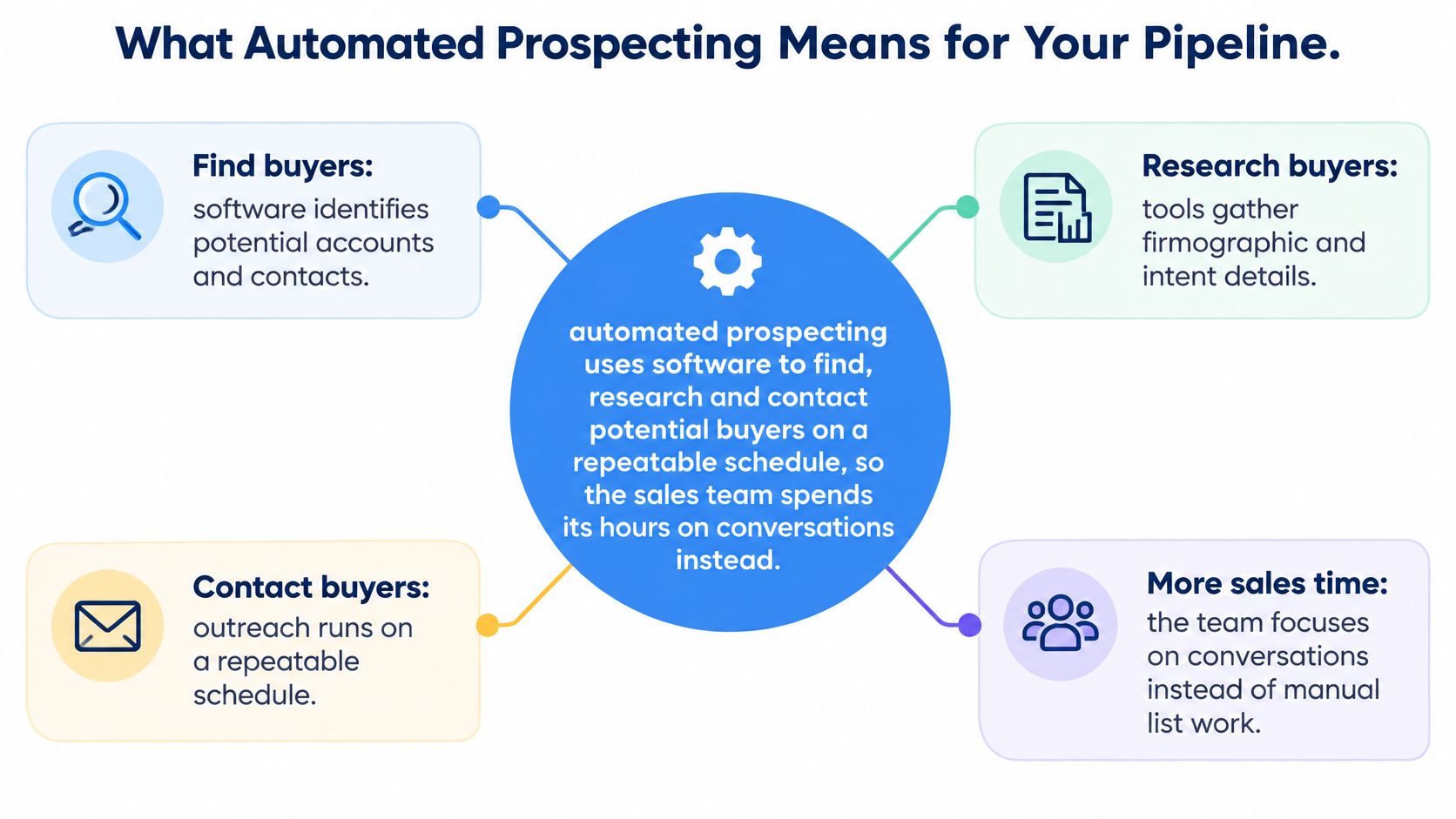
Automated prospecting uses software to find, research, and contact potential buyers on a repeatable schedule, so salespeople spend their time on conversations instead of list building.
Take that Monday spreadsheet. Instead of asking a rep to rebuild it, you configure a workflow to identify suitable companies, enrich their records, and prepare relevant outreach. The sales manager approves the targeting rules and reviews exceptions before messages leave the system.
It's like cruise control: software maintains speed, but the driver still steers. A buying signal can justify investigating an account. It can't establish that the account needs your product.
The diagram captures the basic relationship between the work software handles and the time your team gets back.
More than a message scheduler
Manual cold outreach requires someone to research, write, send, and remember each follow-up. A sequencing tool automates the sending schedule. A broader prospecting system also handles account selection, data collection, enrichment, drafting, and reply routing.
At Lead Printer, we find prospects for customers and use live buying signals to reach out when prospects are most likely to say yes. That timing informs account selection, rather than only determining when a scheduled message goes out.
For teams exploring how public business information becomes a usable prospect database, Scrappey's lead generation playbook provides useful context on the collection side. Collection is only the starting point, though. You still need to decide which records belong in a campaign.
Adoption doesn't establish relevance
In 2024, 81% of sales teams were either experimenting with or had fully implemented AI, according to Salesforce's survey of 5,500 sales professionals across 27 countries. That describes AI adoption broadly, not universal success with automated outbound.
The same software can prepare a useful introduction or distribute irrelevant messages. Before choosing tools, identify your bottleneck: finding suitable prospects, reaching them reliably, or converting interested replies into opportunities. Automating the wrong bottleneck just gives your team more work elsewhere.
How the Stages of Automated Prospecting Fit Together
Treat automated prospecting as a connected process, not a collection of subscriptions. Each stage needs an accepted input, a usable output, and a person authorized to stop the workflow.
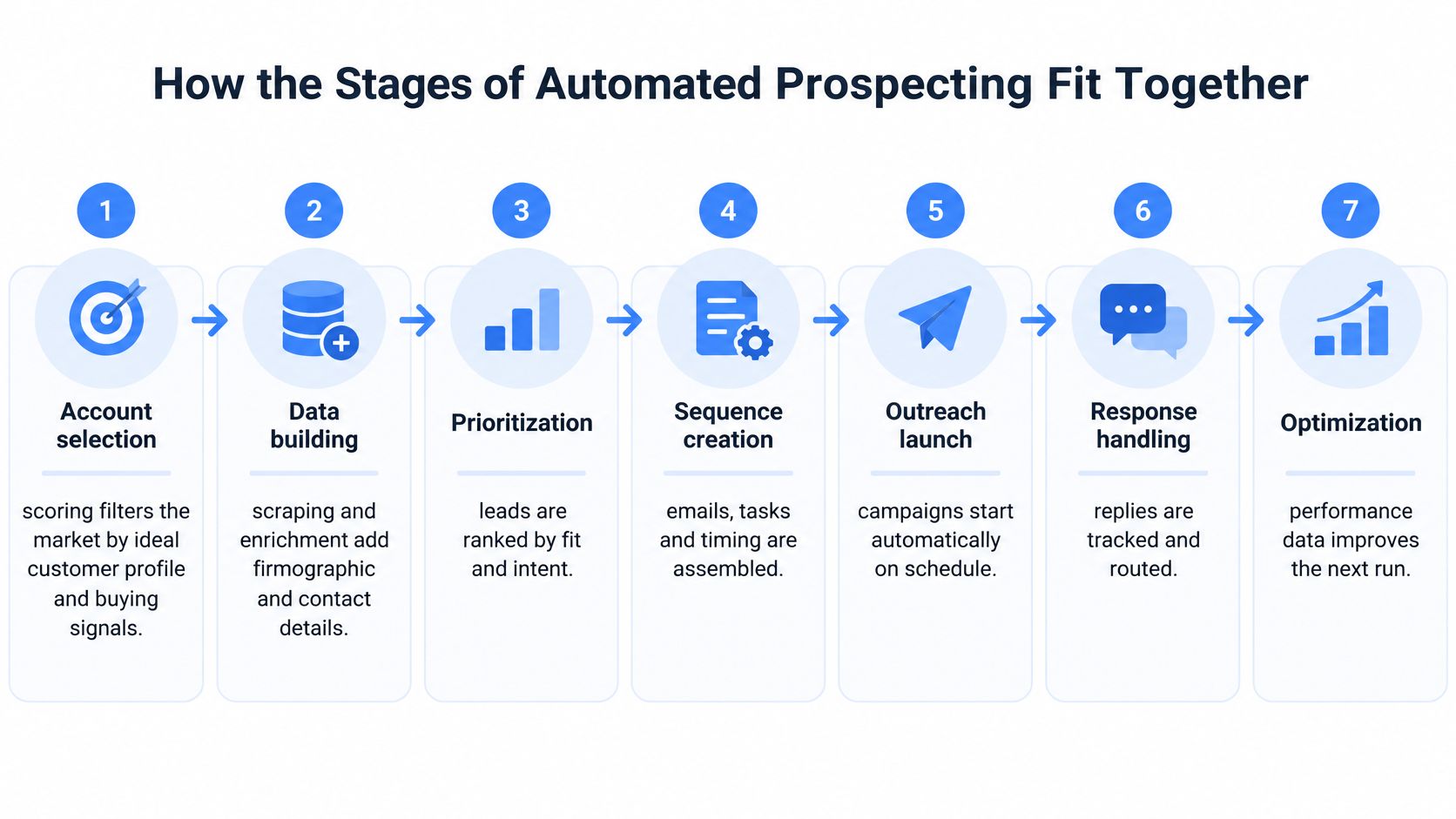
This flowchart shows the progression from identifying accounts to improving the next campaign.
From market definition to a conversation
Account selection starts with your ideal customer profile, or ICP, and observable buying signals. Software produces a ranked account list; the sales lead decides whether the criteria describe businesses you can help.
Data building turns those accounts into usable company and contact records. The output should include source evidence and verification status, not just populated fields.
Infrastructure takes approved sending identities and mailbox settings and produces a launch-ready sending environment. A person must authorize the domains, limits, and readiness criteria.
Messaging uses approved records, personas, and proof points to produce drafts. Sending and follow-up then turn approved sequences into scheduled activity, subject to channel rules and stop conditions.
Finally, qualification and handoff convert replies into seller-owned conversations. Measurement connects campaign activity to CRM outcomes so someone can decide what to retain, revise, or stop.
Automated prospecting stages and the human decision in each
| Stage | What Gets Automated | What Stays Human | Typical Inputs |
|---|---|---|---|
| Account selection | Scoring and filtering by ICP and buying signals | Choosing the target market and profile criteria | Firmographics, hiring activity, tech stack |
| Data building | Scraping and enrichment merged into one record per company | Setting data rules and accuracy thresholds | LinkedIn Sales Navigator, Google Maps, registries |
| Infrastructure | Domain setup workflows, inbox creation, and warm-up schedules | Approving sending domains and daily volume caps | DNS records, mailbox settings |
| Messaging | Sequence drafts and variable insertion | Approving offers, claims, and high-value messages | Persona, pain point, proof points |
| Sending and follow-up | Timed sequences across email and LinkedIn | Handling sensitive or unusual replies | Sequence schedule, channel rules |
| Qualification and handoff | Reply classification and calendar booking | Judging fit and answering objections | Reply text, calendar availability |
| Measurement | Dashboards for delivery, reply, and meeting rates | Deciding what to change and what to stop | Campaign logs, CRM records |
Design the handoffs explicitly
The stages connect through acceptance rules. An unverified contact shouldn't enter a sequence. An unapproved claim shouldn't reach sending. A reply expressing uncertainty shouldn't become a qualified opportunity merely because a classifier detects positive language.
Weak upstream work can remain hidden until much later. Excellent copy won't rescue poor account selection, and careful targeting won't compensate for a sending identity that fails authentication.
Use the accompanying video as another way to examine the workflow and its handoffs.
Practical rule: The more consequential the decision, the more human review it deserves.
Automate reversible housekeeping confidently. Require approval before changing market criteria, publishing unsupported claims, or committing a seller's time to a supposedly qualified opportunity.
Data, Infrastructure and Deliverability Foundations
Start the infrastructure work early, while your sales lead defines targeting. Don't load a campaign just because the list is ready. Sending readiness and data readiness are separate approvals.
At Lead Printer, our setup period includes email infrastructure setup and warm-up, a strategy and onboarding meeting, copywriting, and list building using web scraping and AI sales research automation. Those activities need coordination, not a race to the send button.
Build records you can verify
Use LinkedIn Sales Navigator for company and role filters, Google Maps for local businesses, targeted websites for product and hiring evidence, and national registries for legal-entity checks. In our Research step, we use Clay and scraping from LinkedIn Sales Navigator, Google Maps, and targeted websites to build prospect databases.
Merge company records using a stable identifier, such as the company website, while keeping individual contacts distinct. Add location, headcount, technology information, and relevant triggers only when you can retain their provenance.
- Preserve evidence: Store the originating page and collection time alongside important fields.
- Resolve conflicts: Flag conflicting roles or company identities instead of choosing a value.
- Exclude unusable records: Remove contacts when a campaign-critical field can't be verified.
If your workflow needs web information delivered programmatically, evaluate a web data api from Context.dev as part of the collection architecture. Assess source coverage and traceability before connecting any enrichment output directly to messaging.
Authenticate before increasing activity
Use explicitly mapped sending domains or subdomains to separate operational traffic, but don't assume separation guarantees protection for your main brand. Recipients can still associate unwanted outreach with your business.
The FTC's email authentication staff perspective explains the roles of SPF, DKIM, and DMARC in helping businesses protect against spoofing. Apply them in a controlled order:
- Authorize sending services with SPF. Include only infrastructure you use.
- Enable DKIM signing. Cover every service sending on your behalf.
- Introduce DMARC monitoring. Check alignment with the visible From domain.
- Review aggregate reports. Investigate unknown senders and legitimate streams that fail.
- Tighten enforcement carefully. Move toward quarantine or reject after legitimate traffic passes consistently.
Warm-up means introducing activity gradually while observing results, not manufacturing permission or guaranteeing inbox placement. Our guide to warming up an email domain explains that operational preparation.
Pre-launch approval requires authenticated identities, verified lists, and explicit daily caps. Recheck authentication whenever you add a sending service.
Personalization That Lifts Replies Without Feeling Generic
A rep opens a prospect record and sees the company hiring implementation staff while expanding into a second region. That observation can support a message about coordination load. A first-name merge cannot.
Useful personalization connects an observable business condition to a plausible reason for talking. That condition might be a hiring push, a relevant technology, geographic expansion, or a visible product gap. It gives the recipient a reason to consider your offer without pretending you know their internal priorities.
In 2024, 20% of surveyed business professionals reported using AI tools to support outreach to prospects, according to HubSpot's State of AI data. That finding doesn't establish how everyone else wrote outreach or how well AI-assisted messages performed.
Turn evidence into a restrained hypothesis
Automation can collect the hiring evidence, classify the account, and draft an angle. The checkpoint is deliberate: a person approves the inference between the evidence and the proposed problem before the sequence enters rotation.
Say a workflow software vendor identifies an operations team recruiting implementation staff. A relevant draft could connect growing implementation work with approval coordination. It shouldn't assert that the company has missed deadlines or dissatisfied customers.
Lead Printer's Copywriting step writes personalized sequences from deep research, including technology stack analysis, mutual connections, and competitive intelligence. Those details should shape the message's usefulness rather than become a list of facts inserted to prove research happened.
For the underlying writing principles, the explanation of email copywriting separates persuasive structure from decorative personalization. Once the substance is sound, Lumi Humanizer's guidance can help teams refine the tone of AI emails, without treating smoother language as a substitute for evidence.
Test the business condition as a variable
Treat a personalization angle as a hypothesis worth comparing against a control group, especially when the angle is tied to a real business condition rather than a cosmetic detail.
Run your own controlled comparison:
- Keep the offer constant: Don't change the proposition and personalization simultaneously.
- Randomize comparable prospects: Split within the same segment rather than comparing unrelated industries.
- Define success beforehand: Prefer positive replies or qualified meetings to replies of any kind.
- Inspect the variable: Report outcomes by segment and personalization signal.
Set confidence requirements for enriched fields, require human approval for high-value accounts, and suppress unverifiable claims. For localized outreach, review language and business meaning, not just translation accuracy.
A polished sentence built on a false assumption is still a bad message.
Benefits, ROI and the Metrics That Prove It Works
A benchmark reported by RepOrderManagement's sales automation statistics overview associates sales-force automation software with an average 14.5% productivity increase. It isn't a revenue guarantee or proof that automation alone caused the improvement.
Your return depends on what employees do with the time recovered and whether the resulting conversations progress. Include data, tools, infrastructure, campaign management, and seller follow-up in your cost model.
Translate leads into commercial outcomes
At Lead Printer, our clients book meetings with every 3–4 leads and need 10–20 leads to close a sale. These are reported client patterns, not universal conversion assumptions.
Define lead before using those relationships. An interested prospect is not the same unit as a scraped contact or delivered email. Mixing those definitions can make an uneconomic campaign look attractive.
For planning, use the following chain without assuming a particular budget or deal target:
- Required leads: Target won deals multiplied by leads needed per sale.
- Implied meetings: Required leads divided by leads needed per meeting.
- Cost per won deal: Total attributable program cost divided by actual won deals.
- Net return: Attributable gross profit minus program cost, divided by program cost.
Calculate both ends of your lead-to-sale assumptions. Keep the meeting range consistent with those assumptions, and replace planning estimates with actual cohort results once deals mature.
In 2024, 83% of sales teams using AI reported revenue growth during the previous year, compared with 66% of teams not using AI, according to Salesforce's sales statistics. That's a correlation, not evidence that purchasing an AI tool will cause growth.
Read performance in pipeline order
Core metrics for an automated prospecting program
| Metric | How to Calculate It | What It Tells You |
|---|---|---|
| Delivery rate | Delivered emails divided by sent emails | Whether infrastructure and list quality are sound |
| Reply rate | Replies divided by delivered emails | Whether the message earns attention |
| Positive reply rate | Interested replies divided by delivered emails | Whether the offer and targeting fit |
| Meeting rate | Meetings booked divided by delivered emails | Whether the call to action converts |
| Qualified opportunity rate | Opportunities passing discovery divided by meetings | Whether prospects are a real fit |
| Cost per qualified meeting | Total program cost divided by qualified meetings | Whether the program beats other channels |
| Hours saved per rep | Research and admin hours before automation minus hours after | Whether the productivity gain is real |
| Pipeline contribution | Pipeline value from automated sources divided by total pipeline | Whether the channel earns its budget |
Delivery means the receiving server accepted the email, not that the recipient saw it in their inbox. A healthy delivery rate therefore needs supporting checks on bounce responses, complaints, and sender reputation.
Investigate delivery first, relevance next, and meeting conversion after that. Then examine discovery outcomes, actual wins, and gross profit. Track booked and attended meetings separately so calendar activity doesn't disguise a weak handoff.
Sending volume is the last metric to celebrate. It describes activity, not commercial value.
A Sample Campaign Workflow and Where People Step In
Consider a hypothetical B2B SaaS company selling workflow software to mid-market operations teams. Its sales lead wants conversations with organizations coordinating work across departments, not every company employing an operations manager.
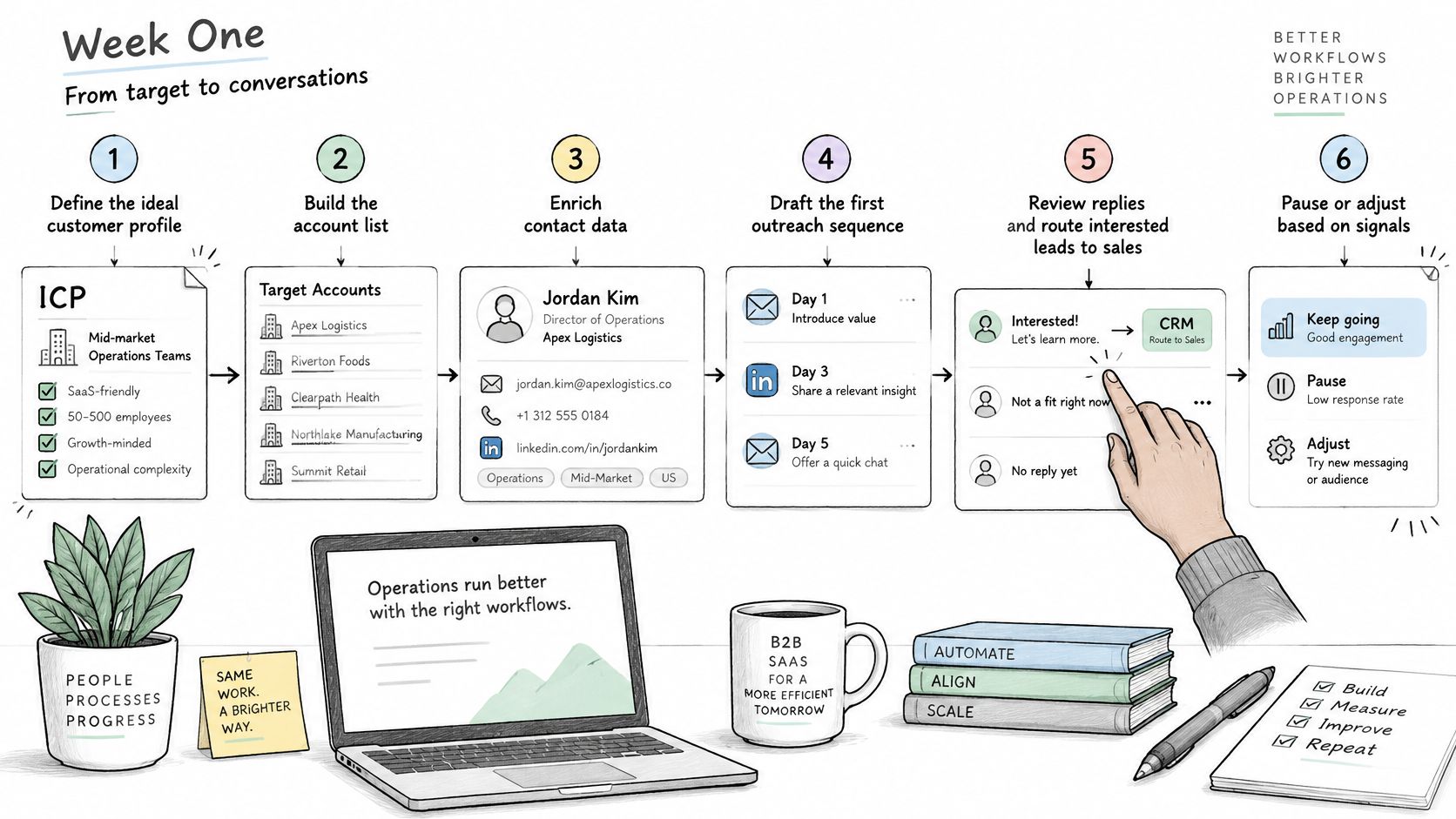
The illustrated workflow follows that campaign from account definition to engagement.
Build the campaign around approval gates
Agree on the customer profile. During initial planning, the sales lead identifies supported industries, operating regions, organizational complexity, and exclusion criteria. Human checkpoint: approve the criteria against the product's actual capabilities, including integration limitations.
Build the account list from relevant registries and LinkedIn, then add headcount, technology evidence, and recent hiring information. The operations owner examines a random sample and checks ambiguous matches. Human checkpoint: confirm source permissions and the applicable privacy and electronic-marketing requirements for the intended contacts, including EU and UK recipients.
Prepare the sending environment. The technical owner checks authentication, mailbox access, monitoring, and gradual sending readiness. Campaign launch remains blocked until that owner signs off, even if the copy is finished.
Draft a short sequence for each persona, using a single clear trigger-based hypothesis per segment. For example, messages to an operations director can focus on coordination, while messages to an IT stakeholder address integration questions. Human checkpoint: approve initial drafts and individually review strategically important accounts.
Make the handoff usable for the seller
Launch within approved limits. The campaign manager watches bounce responses, complaint signals, and unexpected sending behavior. A stop rule should pause affected activity without waiting for a reporting meeting.
Classify replies and route interested prospects with their original message, trigger evidence, company context, and conversation history. Human checkpoint: the assigned rep handles objections, ambiguous interest, and product-fit questions rather than allowing the classifier to improvise commitments.
Review by segment after replies have had time to arrive. The sales lead compares qualified conversations, rejected opportunities, and reasons for disqualification. Changes to targeting require a fresh approval, not merely a higher score in the system.
At Lead Printer, clients can review messaging, lead targeting, and personalization strategy before campaigns go live. That review gives the client an opportunity to catch commercial nuances the campaign team might otherwise miss.
Ownership test: If nobody can name who approves a decision, the campaign isn't ready to automate that decision.
The software moves approved work forward. People authorize the consequential transitions, including whether the team should pursue the conversation at all.
Implementation Pitfalls and How to Prevent Them
Automation can run a sequence flawlessly while the team emails buyers who were never going to say yes. Recipients tend to ignore or resent outreach that feels irrelevant to them, so a completed sequence is never evidence that it helped. The dangerous assumption is that a functioning workflow equals a successful campaign.
Each failure below is predictable, so treat every checkpoint as a design decision made in advance, with a person inspecting the work before a small error reaches thousands of inboxes.
Pair predictable failures with controls
- Incorrect enrichment: Require evidence for message-critical fields and sample-check each batch. Track corrections and exclusions so the data owner can identify unreliable sources.
- Premature scaling: Make volume increases conditional on approved delivery, bounce, and complaint criteria. The infrastructure owner must be able to pause sending.
- Unanswered interest: Assign an inbox owner and a response-time target before launch. Monitor the age of unassigned and unanswered replies.
- Compliance gaps: Check sender identification, opt-out handling, suppression, and applicable contact rules before sending. Have the responsible privacy or legal reviewer resolve uncertainty rather than assuming public availability means unrestricted use.
- Invented proof: Require an approved evidence source for every customer name, performance claim, and product capability in a template.
- Overreading early results: Compare comparable segments and mature outcomes before declaring a channel successful. Use cost per qualified meeting alongside discovery quality.
Give the control an owner
A checklist without accountability is easy to ignore. The list works like a pre-flight inspection: every item exists because a specific failure already cost someone a campaign, and the inspection only counts if a named person signs for it. Record who owns each control, what evidence they review, and which signal triggers intervention.
Every predictable failure needs a named owner and an early-warning metric. Otherwise, the team usually discovers the problem through a lost opportunity or an unhappy recipient.
Decide Whether to Build In-House or Outsource
Build in-house when you have a dedicated sales operations owner, a stable customer profile, and enough capacity to maintain the system. Outsource when access to experienced execution matters more than developing the capability internally.
Neither option removes your responsibility for commercial judgment. The question is who performs the work, who approves decisions, and who retains the assets.
In-house vs outsourced automated prospecting
| Factor | Build In-House | Outsource |
|---|---|---|
| Best fit | Stable team with prospecting skills and time to build data and infrastructure | Lean team or new market needing execution support |
| Time to first leads | Setup must cover tools, data, and sending readiness | Can be faster when usable infrastructure and processes already exist |
| Data and deliverability ownership | Full control and full responsibility | Responsibilities defined in the contract |
| Messaging iteration | Internal copywriting and testing capability | Evaluate the provider's actual review and testing process |
| Compliance and risk | Team confirms applicable rules and suppression handling | Provider documents its responsibilities; client retains oversight |
| Cost structure | Tools, data, and staff time | Service fee plus internal oversight |
| Exit risk | Assets remain under internal control | Confirm ownership and export rights for lists, domains, and data |
Make the decision with a capacity check
Before committing, estimate how many qualified accounts your ICP can produce each month. Then cost the tools, data, technical maintenance, research review, and inbox coverage needed to work that market responsibly.
Name the people who would own sending readiness and reply handling. If those names are already attached to overloaded roles, an internal build may be cheaper on paper than in practice.
Our guide to sales development outsourcing provides further context for separating external execution from internal sales ownership. With either model, document message approval, reply escalation, suppression handling, reporting definitions, and exit arrangements.
Assess outbound fit before buying execution
At Lead Printer, we review a prospect's business and give an honest answer about whether outbound fits. Prospects can book a quick demo through the website form.
Our free pipeline audit lasts 45 minutes, maps the client's ICP, and estimates how many qualified leads outbound could bring each month. We also promise 20+ qualified leads within 30 days, or a refund.
Evaluate that offer alongside your own economics and qualification criteria. A lead target only helps when your team agrees on what qualifies and has capacity to handle the resulting conversations.
Visit Lead Printer to book a free pipeline audit and assess whether automated prospecting fits your market. We'll map your ideal customer profile, estimate the qualified lead potential, and discuss where your team should retain approval before outreach goes live.